














Authentication vs Authorization: Key Differences Guide
Learn authentication vs authorization with examples, JWT, OAuth, RBAC, MFA, best practices, and security tips.
Authentication vs Authorization: Key Differences, Examples & Best Practices
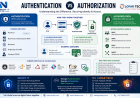
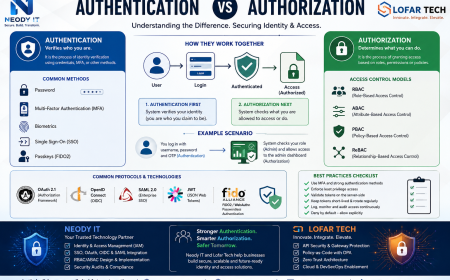
Authentication and authorization are two of the most important security concepts in modern software development. Yet, they are often confused with one another. If you've ever logged into an application and then accessed a specific dashboard, API, or feature, you've already experienced both processes in action.
In simple terms:
-
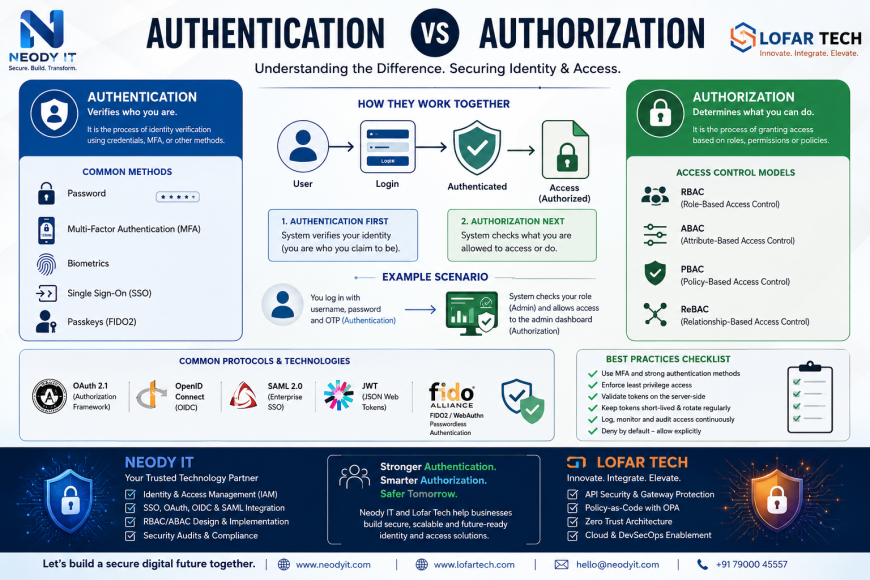
Authentication answers: Who are you?
-
Authorization answers: What are you allowed to do?
Understanding the difference between authentication and authorization is critical for developers, DevOps teams, security engineers, and businesses building secure digital products. As cloud computing, microservices, Zero Trust security models, and remote work continue to grow in 2026, implementing both correctly has become a necessity rather than an option.
At Neody IT, we frequently help organizations design secure authentication and authorization architectures for web applications, mobile apps, SaaS platforms, and enterprise systems. This guide will help you understand the concepts, practical implementations, common mistakes, and future trends.
Why This Distinction Matters Today
Security breaches are no longer caused only by weak passwords. Many modern incidents happen because applications incorrectly grant access to users who should not have certain permissions.
Consider a simple example:
-
A user successfully logs into a system.
-
The application authenticates them correctly.
-
Due to a flawed authorization policy, they gain access to administrative features.
The login process worked perfectly. The access control did not.
This distinction is becoming increasingly important because of:
-
Cloud-native architectures
-
Microservices ecosystems
-
Zero Trust security models
-
GDPR and PCI compliance requirements
-
Growing API-based integrations
-
Increasing use of JWT tokens and OAuth
Organizations that misunderstand authentication vs authorization often expose sensitive data, create privilege escalation vulnerabilities, and fail compliance audits.
Overview of Authentication vs Authorization
Think of authentication and authorization like entering a secure office building.
-
Authentication verifies your identity at the entrance.
-
Authorization determines which rooms you can access inside.
Both are essential.
What is Authentication?
Authentication is the process of verifying a user's identity.
The system confirms that the person attempting access is genuinely who they claim to be.
Common authentication methods include:
-
Username and password
-
Multi-Factor Authentication (MFA)
-
Biometrics
-
Single Sign-On (SSO)
-
Passkeys
-
FIDO2 authentication
-
Magic links
After successful identity verification, the system typically issues:
-
A session
-
An access token
-
A JWT
-
Authentication cookies
Example
A user logs into an e-commerce platform using:
-
Email and password
-
One-time code from an authenticator app
This combination provides strong identity verification through MFA.
What is Authorization?
Authorization determines what actions an authenticated user can perform.
Once identity verification is complete, the application evaluates permissions, roles, policies, or attributes.
Common authorization models include:
Role-Based Access Control (RBAC)
Permissions are assigned to roles.
Example:
-
Admin → Read, Write, Delete
-
Editor → Read, Write
-
Viewer → Read only
Attribute-Based Access Control (ABAC)
Access decisions depend on attributes such as:
-
Department
-
Location
-
Device type
-
Time of access
Policy-Based Access Control (PBAC)
Policies define rules dynamically.
Often implemented using tools such as Open Policy Agent (OPA).
How Authentication and Authorization Work Together
A typical flow looks like this:
-
User enters credentials
-
Authentication verifies identity
-
Access token is generated
-
Authorization evaluates permissions
-
Requested resource is granted or denied
For example:
-
Authentication confirms Alice is Alice.
-
Authorization determines whether Alice can access the Admin Dashboard.
This relationship explains why "auth vs authz" is such a common interview and industry discussion topic.
Core Concepts and Components
Identity Providers (IdP) and Service Providers (SP)
An Identity Provider manages user identities and authentication.
Examples include:
-
Google
-
Microsoft Entra ID
-
Okta
-
Keycloak
-
Auth0
A Service Provider relies on the Identity Provider for authentication.
Example
When users click "Continue with Google":
-
Google acts as the IdP.
-
Your application acts as the Service Provider.
This enables Single Sign-On (SSO).
Tokens, Sessions, and Credentials
Modern applications commonly use:
| Method | Best For |
|---|---|
| Session Cookies | Traditional web apps |
| JWT Tokens | APIs and mobile apps |
| Opaque Tokens | High-security environments |
| Refresh Tokens | Long-term sessions |
JWT vs Session Cookie
JWT advantages:
-
Stateless
-
Scalable
-
Ideal for microservices
Session advantages:
-
Easier revocation
-
Smaller attack surface
-
Simpler permission updates
Authentication Methods & Factors
Authentication factors are generally categorized as:
Something You Know
-
Password
-
PIN
Something You Have
-
Mobile device
-
Hardware security key
Something You Are
-
Fingerprint
-
Face recognition
Modern passwordless authentication increasingly uses passkeys and FIDO2 standards to eliminate traditional passwords.
Authorization Models
RBAC
Best for:
-
Corporate systems
-
Admin dashboards
-
ERP platforms
ABAC
Best for:
-
Multi-tenant SaaS
-
Healthcare systems
-
Financial applications
Capability-Based Authorization
Uses tokens that directly grant specific capabilities.
Policy Engines
Tools such as OPA provide centralized policy management across distributed systems.
Benefits and Advantages
Benefits of Strong Authentication
Strong authentication provides:
-
Reduced account takeover attacks
-
Better audit trails
-
Improved compliance
-
Enhanced customer trust
-
Lower fraud risk
Organizations implementing MFA often significantly reduce successful credential-based attacks.
Benefits of Robust Authorization
Effective authorization delivers:
-
Principle of least privilege
-
Better data protection
-
Reduced insider threats
-
Strong tenant isolation
-
Improved operational security
Even if an attacker compromises an account, robust authorization limits damage.
Example Use Cases
Web Applications
-
Login via SSO
-
Role-based dashboard access
REST APIs
-
OAuth access tokens
-
Scope-based authorization
Microservices
-
Service-to-service authentication
-
Policy-driven authorization
IoT Platforms
-
Device identity verification
-
Resource-level access control
Step-by-Step Authentication and Authorization Implementation
Authentication Implementation Steps
1. Select an Authentication Method
Options include:
-
Password + MFA
-
Passkeys
-
OAuth/OIDC
-
Enterprise SSO
2. Integrate an Identity Provider
Popular choices:
-
Auth0
-
Keycloak
-
Okta
-
Azure AD
3. Secure Credential Storage
Always:
-
Hash passwords using Argon2 or bcrypt
-
Never store plain-text passwords
4. Enable MFA
Add:
-
TOTP
-
Push notifications
-
Security keys
Authorization Implementation Steps
1. Define Roles
Example:
-
Admin
-
Manager
-
Employee
-
Customer
2. Map Permissions
Example:
| Permission | Admin | Manager | User |
|---|---|---|---|
| Read | Yes | Yes | Yes |
| Write | Yes | Yes | No |
| Delete | Yes | No | No |
3. Enforce Checks Server-Side
Never trust client-side role information.
4. Log Access Decisions
Maintain detailed audit trails.
Token Handling Best Practices
-
Use HTTPS everywhere
-
Keep token claims minimal
-
Rotate refresh tokens
-
Set short expiration periods
-
Use secure cookies where possible
-
Enable SameSite protection
JWT Verification Example
const payload = verifyJWT(token);

if(payload.role !== "admin"){
   return denyAccess();
}

return allowAccess();
Always validate signatures before trusting claims.
Best Practices and Hardening Tips
Security First Principles
Follow these fundamentals:
-
Least privilege access
-
Defense in depth
-
Encryption at rest
-
Encryption in transit
-
Regular security audits
Authentication Best Practices
-
Enforce MFA
-
Support passkeys
-
Rate limit login attempts
-
Detect unusual login behavior
-
Use reputable Identity Providers
Authorization Best Practices
-
Deny by default
-
Centralize policies
-
Use fine-grained permissions
-
Validate access on every request
-
Regularly review user roles
Operational Practices
Monitor:
-
Failed login attempts
-
Privilege escalation events
-
Token abuse
-
Suspicious API access
Comprehensive logging significantly improves incident response capabilities.
Challenges and Limitations
Usability vs Security Tradeoffs
Security often introduces friction.
Examples:
-
MFA increases security but can reduce convenience.
-
Frequent reauthentication may frustrate users.
Adaptive authentication helps balance usability and protection.
Multi-Domain and Cross-Service Authentication
Challenges include:
-
Cookie domain restrictions
-
Cross-origin requests
-
Token exchange complexity
-
SSO implementation overhead
Legacy Systems
Many organizations still rely on legacy software not designed for modern authentication protocols.
Solutions often involve:
-
Identity gateways
-
Reverse proxies
-
Strangler migration patterns
Compliance Requirements
Organizations must consider:
-
Data residency laws
-
Audit requirements
-
User consent
-
Retention policies
Real World Examples and Case Studies
Web Application: Admin Panel Protection
Scenario:
An e-commerce platform has:
-
Customers
-
Support agents
-
Administrators
Authentication verifies user identity.
Authorization determines whether the user can access:
-
Orders
-
Product management
-
Financial reports
A customer should never see administrative functions, even after successful login.
API: Token-Based Authorization
A third-party application requests access to user data.
Flow:
-
User grants consent
-
OAuth issues token
-
Token includes scopes
-
API validates scopes
-
Requested data is returned
This is a classic authentication vs authorization example in REST APIs.
Microservices: OPA Authorization
Modern microservices often use:
-
Envoy Proxy
-
Open Policy Agent
Workflow:
-
Request arrives
-
Authentication validates token
-
OPA evaluates policy
-
Access granted or denied
This approach enables policy-as-code across large infrastructures.
Passwordless Authentication Example
A user visits an application.
Instead of entering a password:
-
Device prompts biometric verification
-
Passkey validates identity
-
User is authenticated instantly
The result is stronger security and a smoother user experience.
Future Trends and Industry Insights
Passwordless and Passkeys Adoption
Passkeys are rapidly replacing traditional passwords.
Benefits include:
-
Phishing resistance
-
Better user experience
-
Reduced support costs
Decentralized Identity (DID)
Self-sovereign identity systems give users greater control over credentials and personal information.
This area is expected to grow significantly over the next decade.
AI-Powered Adaptive Authentication
Machine learning models increasingly analyze:
-
Login behavior
-
Device fingerprints
-
Geographic patterns
Risk-based authentication improves security while reducing user friction.
Policy-as-Code
Authorization policies are increasingly treated like application code.
Benefits include:
-
Version control
-
CI/CD integration
-
Automated testing
-
Improved governance
At Neody IT, policy-driven security architectures are becoming a common recommendation for organizations building scalable SaaS platforms and enterprise applications.
Frequently Asked Questions (FAQ)
Is authentication the same as authorization?
No. Authentication verifies identity, while authorization determines permissions after identity has been verified.
Which comes first, authentication or authorization?
Authentication almost always occurs first. The system must know who the user is before determining what they can access.
What is the difference between authentication and authorization in web applications?
Authentication confirms user identity through methods like passwords, MFA, or passkeys. Authorization controls access to pages, APIs, and resources based on permissions.
When should I use JWT vs sessions?
JWTs work well for APIs, mobile applications, and distributed systems. Session cookies are often better for traditional web applications that require simple revocation and tighter control.
Can I trust client-side role claims?
No. Authorization decisions should always be enforced on the server side. Client-side information can be modified by attackers.
How does OAuth relate to authentication and authorization?
OAuth primarily handles authorization by granting limited access to resources. OpenID Connect extends OAuth to support authentication.
How do I migrate to passwordless authentication?
Start with optional passkey support, maintain password fallback methods, educate users, and gradually encourage adoption through improved user experience.
Final Thoughts
Understanding authentication vs authorization is fundamental to building secure modern applications. Authentication verifies identity, while authorization controls access. Both must work together to protect users, systems, and sensitive data.
The most effective security strategy combines:
-
Strong authentication through MFA, SSO, or passkeys
-
Least-privilege authorization using RBAC, ABAC, or policy-based controls
-
Continuous monitoring, auditing, and policy reviews
As organizations move toward Zero Trust architectures, cloud-native systems, and passwordless authentication, mastering these concepts will remain essential for developers, security teams, and technology leaders.
How Neody IT Can Help
Need help implementing secure authentication and authorization in your application?
Neody IT helps startups, enterprises, and SaaS businesses design and deploy modern identity and access management solutions.
Services We Offer
-
Authentication architecture consulting
-
OAuth 2.1 and OpenID Connect integration
-
Single Sign-On (SSO) implementation
-
RBAC and ABAC policy design
-
Security audits and access reviews
-
JWT and token security assessments
-
Keycloak and managed IdP deployments
-
API security and microservices authorization
Whether you're building a new platform or modernizing an existing system, Neody IT can help create a scalable and secure authentication and authorization strategy.
Follow Neody IT for more practical technology insights, development guides, and cybersecurity best practices.
What's Your Reaction?
 Like
0
Like
0
 Dislike
0
Dislike
0
 Love
0
Love
0
 Funny
0
Funny
0
 Angry
0
Angry
0
 Sad
0
Sad
0
 Wow
0
Wow
0