


How to Start Your Coding Career in 2026: Complete Beginner Roadmap
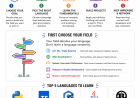
Learn how to start your coding career in 2026 with this beginner-friendly roadmap. Discover what to learn first, how to choose a programming field, and whether Python, TypeScript, C++, Java, or Rust is right for you.
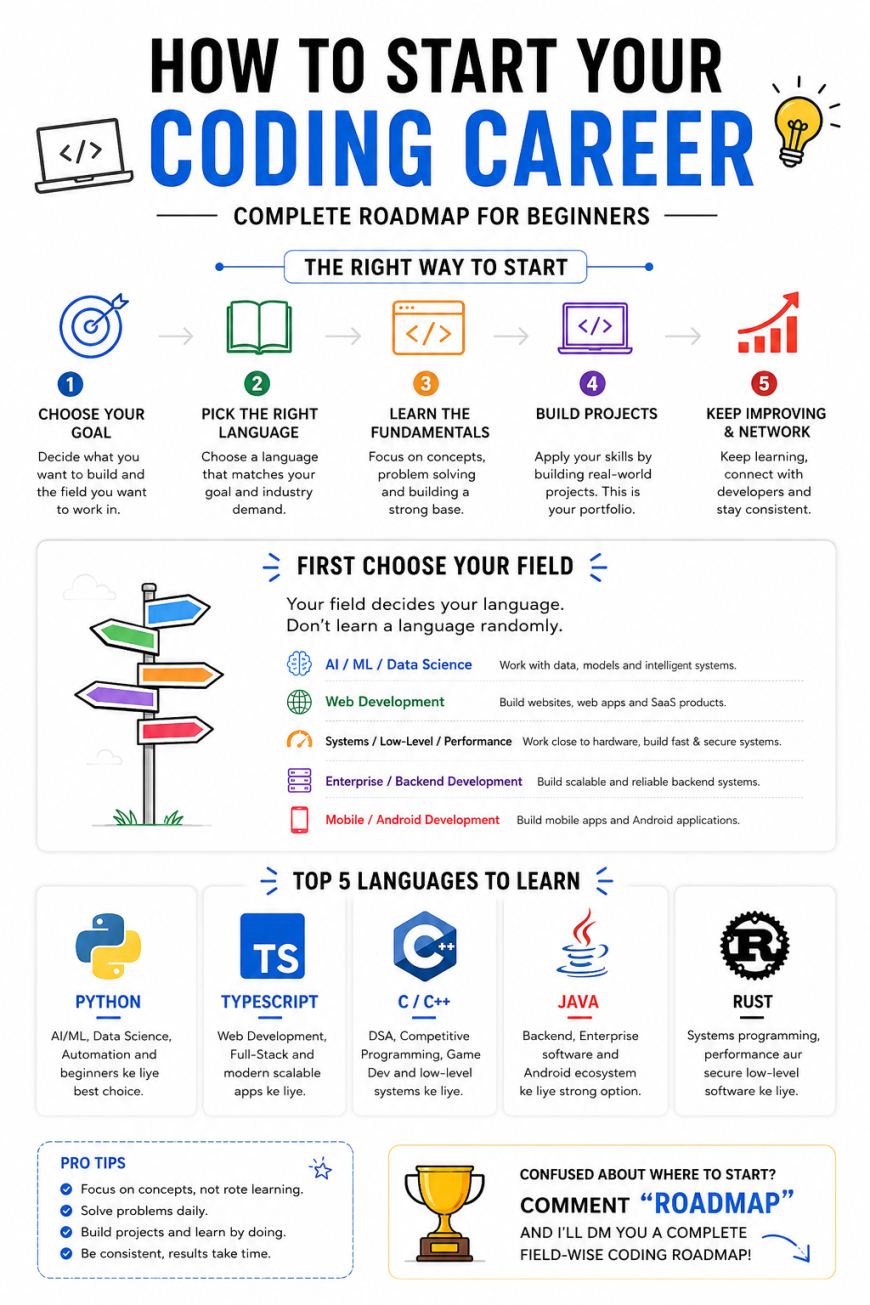
How to Start Your Coding Career: What to Learn, Which Programming Language to Choose, and
How to Actually Become a Developer
If you are planning to start a career in coding, there is a very good chance that you have already encountered the same question hundreds of beginners ask:
“Which programming language should I learn first?”
Should you learn Python?
Should you start with C++?
Is Java still worth learning?
Should you learn JavaScript or TypeScript?
What about Rust?
Should you learn DSA first?
Should you watch a complete 20-hour YouTube course?
Should you join a coding bootcamp?
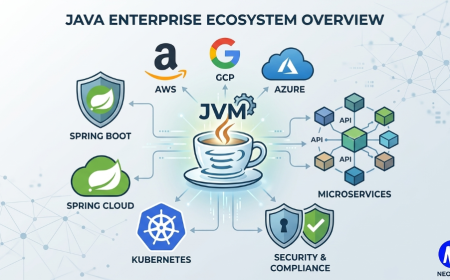
Should you start building projects?
Should you learn everything before applying for internships?
And before you know it, you have twenty browser tabs open, three playlists saved, five roadmaps bookmarked, and absolutely no idea what to do on Monday morning.
This is one of the biggest problems beginners face when entering the world of programming.
They think the first decision is:
“Which language should I learn?”
It usually isn't.
The better first question is:
“What do I actually want to build or work on?”
That small change in thinking can completely change your learning journey.
A programming language is a tool. Your career direction is the destination.
If you choose the tool before deciding where you want to go, you can spend months learning something without understanding how it fits into your career.
This does not mean that learning Python is a bad decision. It does not mean C++ is better than Java, or Rust is the future, or TypeScript is somehow superior to everything else.
It means something much simpler:
The best programming language depends on what you want to do with it.
Python is officially described as an easy-to-learn and powerful language, with applications ranging from scripting and rapid application development to many other areas.
TypeScript adds a type system to JavaScript and is designed to help identify unexpected behavior while working with JavaScript applications.
Java provides a broad platform with extensive documentation and learning material around the language and Java platform.
Rust focuses on combining performance, low-level control, and stronger safety guarantees, making it particularly interesting for systems-oriented development.
And C and C++ remain important choices when you want to understand lower-level programming, performance, memory, systems, competitive programming, or game development.
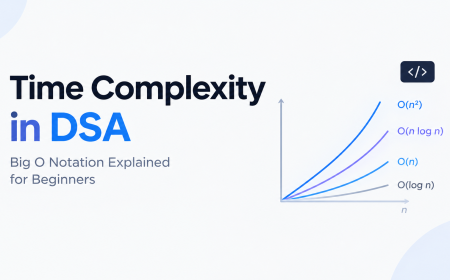
So instead of asking:
“Which language is best?”
ask:
“Which language makes the most sense for the career I want?”
That is where your coding career should begin.
1. The Biggest Mistake Beginners Make
Imagine someone tells you:
“I want to become a doctor.”
You probably wouldn't immediately ask:
“Okay, which stethoscope should you buy?”
You would first ask what kind of doctor they want to become.
Similarly, if someone says:
“I want a career in software.”
The next question shouldn't immediately be:
“Python or C++?”
Software is an enormous field.
You could work in:
-
Web development
-
Mobile development
-
Artificial intelligence
-
Machine learning
-
Data science
-
Cybersecurity
-
Backend engineering
-
Cloud engineering
-
DevOps
-
Game development
-
Embedded systems
-
Systems programming
-
Robotics
-
Automation
-
Blockchain
-
Desktop applications
-
Enterprise software
-
Developer tooling
-
Infrastructure
-
Research
-
And many other areas
Each area has different requirements.
The language is only one piece of the puzzle.
This is why you sometimes see a beginner who has spent six months learning Python but still says:
“I don't know what to build.”
The problem may not be that they need another Python course.
They may need direction.
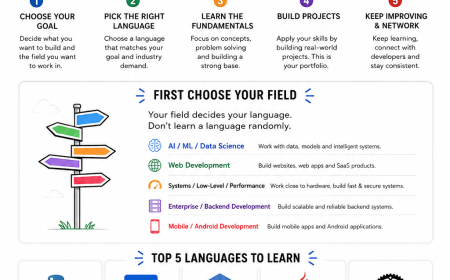
2. Start With the Destination, Not the Language
A simple rule can make your learning process much easier:
First choose the destination.
Then choose the tools.
Think about your career as a journey.
Your destination might be:
Artificial Intelligence
Then Python becomes an obvious candidate.
Your destination might be:
Modern Web Development
Then JavaScript and TypeScript become highly relevant.
Your destination might be:
Competitive Programming and DSA
Then C++ is a very common choice.
Your destination might be:
Enterprise Backend Development
Then Java can be a strong option.
Your destination might be:
Systems Programming
Then C, C++, or Rust may become much more relevant.
The point is not that one language belongs exclusively to one career.
Real-world software is much messier than that.
The point is that some languages naturally fit certain ecosystems and types of work better than others.
3. You Don't Need to Know Your Entire Life Plan
There is another misconception worth clearing up.
You don't need to know exactly what you want to do for the next twenty years.
You only need enough direction to choose your next learning path.
Maybe you are currently interested in AI but aren't sure whether you will eventually work in machine learning engineering, data science, research, or AI application development.
That's fine.
Start exploring.
Maybe you like websites and interfaces but aren't sure whether you want to become a frontend engineer or a full-stack developer.
That's also fine.
Start building websites.
Your first decision does not have to permanently define your career.
Programming is transferable.
Once you understand variables, conditions, loops, functions, data structures, algorithms, debugging, APIs, version control, and software design, moving between languages becomes significantly easier.
The first language is important.
But your ability to think like a programmer is much more important.
4. The Five Languages You Should Know About
For this roadmap, we are going to focus on five languages:
-
Python
-
TypeScript
-
C/C++
-
Java
-
Rust
These aren't the only programming languages worth learning.
There are many others.
JavaScript, C#, Go, Kotlin, Swift, Dart, PHP, Ruby, and many specialized languages can all be useful depending on the field.
But these five provide a useful overview of several major directions in software development.
Let's understand where each one fits.
5. Python - The Flexible Starting Point
If programming languages were people at a party, Python would probably be the person who somehow knows everyone.
Python is used across a huge range of areas.
It is popular for:
-
Artificial intelligence
-
Machine learning
-
Data science
-
Automation
-
Scripting
-
Backend development
-
Scientific computing
-
Prototyping
-
Education
-
Developer tooling
Python's syntax is relatively approachable, and its official documentation describes it as easy to learn while also being powerful and useful for scripting and rapid application development.
That makes it attractive to beginners.
But here's the important part:
Don't learn Python just because everyone on the internet tells you to.
Learn Python if it matches what you want to do.
If your goal is AI, machine learning, data science, automation, or you simply want a relatively approachable language for learning programming fundamentals, Python can make a lot of sense.
6. What Should You Learn in Python?
Do not start by trying to memorize every feature of the language.
You don't need to become a Python encyclopedia.
Start with fundamentals.
Learn:
Variables
Understand how data is stored and represented.
name = "Mayank"
age = 20
You should understand what variables are rather than simply memorizing syntax.
Data Types
Learn common types such as:
-
Strings
-
Integers
-
Floats
-
Booleans
-
Lists
-
Tuples
-
Sets
-
Dictionaries
Conditions
Learn how programs make decisions.
if
elif
else
Loops
Understand:
for
while
Functions
Learn how to divide a program into reusable pieces.
Modules
Understand how code can be organized and reused.
Exceptions
Learn how programs handle errors.
File Handling
Learn how to read and write files.
Object-Oriented Programming
Eventually understand:
-
Classes
-
Objects
-
Inheritance
-
Encapsulation
-
Polymorphism
But don't rush into advanced OOP on your first day.
7. Python Isn't the Career
This distinction is critical.
Suppose you learn:
-
Python syntax
-
Lists
-
Dictionaries
-
Functions
-
Classes
-
Loops
Congratulations.
You know Python basics.
But that does not automatically make you:
-
an AI engineer,
-
a data scientist,
-
a backend engineer,
-
an automation engineer,
-
or a software developer.
A programming language is the medium through which you solve problems.
Your career comes from combining that language with domain knowledge and practical skills.
For example:
Python + Machine Learning
You might learn:
-
NumPy
-
Pandas
-
Matplotlib
-
Scikit-learn
-
PyTorch
-
TensorFlow
-
Data preprocessing
-
Model evaluation
-
Statistics
-
Machine learning concepts
Python + Backend
You might learn:
-
FastAPI
-
Django
-
Flask
-
REST APIs
-
Authentication
-
Databases
-
SQL
-
Caching
-
Deployment
Python + Automation
You might learn:
-
APIs
-
Web automation
-
File processing
-
Scheduling
-
CLI tools
-
Browser automation
-
Database operations
The language is only the foundation.
8. TypeScript - For Modern Web Development
If your goal is modern web development, TypeScript deserves serious attention.
TypeScript is closely connected to JavaScript. Its type system adds additional structure on top of JavaScript, helping developers identify certain kinds of unexpected behavior earlier.
TypeScript is particularly relevant when building larger web applications where maintainability, tooling, and type safety become important.
A typical modern web development path might look something like:
HTML → CSS → JavaScript → TypeScript → React/Next.js → Backend → Database → Deployment
You don't need to learn everything simultaneously.
In fact, trying to learn everything simultaneously is one of the fastest ways to learn nothing properly.
9. Don't Skip JavaScript If You're Learning TypeScript
This is an important point for beginners.
TypeScript is not a completely separate universe from JavaScript.
The TypeScript documentation explains that TypeScript includes JavaScript's features and adds a type system on top.
So if you're targeting web development, you should understand JavaScript fundamentals.
Learn things such as:
-
Variables
-
Functions
-
Arrays
-
Objects
-
Conditions
-
Loops
-
Scope
-
Closures
-
Promises
-
Async/await
-
DOM basics
-
Modules
-
APIs
-
JSON
Then move into TypeScript.
Once you understand JavaScript, TypeScript becomes much easier to appreciate.
10. What Can You Build With TypeScript?
A lot.
You can build:
-
Websites
-
Dashboards
-
SaaS products
-
E-commerce applications
-
Social platforms
-
Admin panels
-
Real-time applications
-
Backend APIs
-
Desktop applications
-
Server-side applications
-
Full-stack applications
For example, you might eventually work with:
Frontend
-
React
-
Next.js
-
Vue
-
Angular
Backend
-
Node.js
-
Express
-
NestJS
-
Fastify
Database
-
PostgreSQL
-
MySQL
-
MongoDB
Infrastructure
-
Docker
-
Cloud platforms
-
CI/CD
-
GitHub Actions
This is why learning TypeScript can be a strong direction for someone who wants to build products on the web.
But again:
Don't learn TypeScript because it's trendy.
Learn it because you want to build things in the ecosystem where it makes sense.
11. C and C++ - Learn How Computers Actually Work
Now we move into a different world.
C and C++ can feel less friendly than Python.
And that's exactly why they can be valuable.
They force you to think more deeply about what your program is doing.
You'll encounter concepts involving:
-
Memory
-
Pointers
-
References
-
Data structures
-
Performance
-
Compilation
-
Memory management
-
Low-level operations
-
Object-oriented programming
-
Templates
-
Systems concepts
For students focusing heavily on DSA and competitive programming, C++ is particularly popular because of its performance and extensive standard library.
C and C++ are also important in areas such as:
-
Game development
-
Operating systems
-
Embedded systems
-
High-performance applications
-
Graphics
-
Systems programming
-
Competitive programming
12. Why C/C++ Is Often Recommended for DSA
Data structures and algorithms are not tied to one programming language.
You can learn DSA using Python, Java, C++, or other languages.
However, C++ is widely used in competitive programming and technical interview preparation.
You get access to powerful standard library components and performance suitable for algorithmic problems.
More importantly, learning C/C++ can help students understand concepts that higher-level languages often hide.
For example:
What happens in memory?
What is a pointer?
How does an array work?
What is stack memory?
What is heap memory?
What does dynamic allocation mean?
What actually happens when you pass something to a function?
These questions become much more concrete when you're working closer to the machine.
13. But Don't Turn C++ Into a Religion
There is a common problem in programming communities.
Someone asks:
“Which language should I learn?”
And suddenly the comments become a battlefield.
One person says:
C++.
Another says:
Java.
Another:
Python.
Another:
Rust.
And someone inevitably appears and says:
“Learn Assembly.”
You don't need to join the war.
There is no universal best language.
If your goal is web development, spending twelve months becoming extremely advanced in C++ before touching the web may not be the most efficient path.
If your goal is competitive programming, spending months learning frontend frameworks might not be the best use of your time.
Your career goal determines your priorities.
14. Java - The Long-Term Enterprise Player
Java has been around for a long time, but "old" does not automatically mean "irrelevant."
Java remains important in many enterprise environments and backend systems.
It is particularly useful for learning:
-
Object-oriented programming
-
Backend development
-
Enterprise software
-
Large-scale application architecture
-
JVM-based development
The official Java learning material covers programming fundamentals and object-oriented concepts such as objects, classes, inheritance, and related language features.
Java's ecosystem is also extensive.
A Java developer might work with technologies such as:
-
Spring
-
Spring Boot
-
Hibernate
-
Maven
-
Gradle
-
PostgreSQL
-
MySQL
-
REST APIs
-
Microservices
-
Cloud infrastructure
15. Why Java Is Useful for Students
Java can be a particularly useful language if your academic or career path involves enterprise software and backend development.
It also provides a structured environment for understanding object-oriented programming.
You'll encounter concepts such as:
-
Classes
-
Objects
-
Interfaces
-
Inheritance
-
Abstraction
-
Encapsulation
-
Polymorphism
-
Generics
-
Collections
-
Exceptions
-
Threads
These concepts transfer well to many other languages.
Java also has extensive official documentation and learning resources. Oracle's Java documentation provides tutorials, developer guides, API documentation, and information about current Java platform developments.
16. Rust - The One People Keep Talking About
Now we arrive at Rust.
Rust has a very different personality.
Rust is designed around the idea of combining low-level control and performance with stronger guarantees around memory safety and reliability.
It is particularly interesting for:
-
Systems programming
-
High-performance software
-
Infrastructure
-
Developer tools
-
Networking
-
Embedded systems
-
Performance-sensitive applications
-
Certain backend services
The official Rust learning material emphasizes performance, reliability, low-level control, and modern tooling.
And yes, Rust can be difficult.
You may encounter concepts like:
-
Ownership
-
Borrowing
-
Lifetimes
-
Traits
-
Pattern matching
-
Concurrency
-
Memory safety
The first time you see some Rust compiler errors, you may question several life decisions.
But the compiler is part of what makes Rust interesting.
The official Rust book specifically teaches concepts such as ownership and concurrency and encourages learners to use compiler feedback as part of the learning process.
17. Should Beginners Start With Rust?
Usually, I would not recommend choosing Rust simply because it is getting attention online.
If you're completely new to programming, starting with a more beginner-friendly language can make the initial learning curve easier.
However, if you are already comfortable with programming and want to explore systems programming, performance, or memory safety, Rust becomes much more attractive.
The official Rust learning resources provide multiple paths, including the Rust Book, Rust by Example, and Rustlings.
The important lesson is:
Don't choose a difficult language just because difficult looks impressive.
Your goal is to become good at building software.
Not to win a suffering competition.
18. So Which Language Should You Actually Choose?
Here's the simple version.
| Career Direction | Strong Starting Choice |
|---|---|
| AI / Machine Learning | Python |
| Data Science | Python |
| Automation | Python |
| Web Development | JavaScript → TypeScript |
| Full-Stack Development | TypeScript |
| DSA / Competitive Programming | C++ |
| Game Development | C++ |
| Enterprise Backend | Java |
| Backend Development | Java / TypeScript / Python |
| Systems Programming | C / C++ / Rust |
| Performance-Critical Software | C++ / Rust |
| Embedded Systems | C / C++ / Rust |
This is a starting point, not a law.
You can build backend systems with Python.
You can build backend systems with TypeScript.
You can build applications in C++.
You can use Java for many different kinds of software.
You can use Rust for web services.
Programming languages are tools with overlapping capabilities.
The table simply helps a beginner choose a sensible direction.
19. The Real Roadmap Is Bigger Than a Programming Language
This is where many beginners get confused.
They think the roadmap is:
Learn Python → Get Job.
Unfortunately, software development doesn't work like that.
A more realistic roadmap is:
Choose a field
↓
Learn programming fundamentals
↓
Learn the relevant language
↓
Learn the ecosystem
↓
Build projects
↓
Learn Git and GitHub
↓
Learn databases and APIs where relevant
↓
Learn DSA/problem solving
↓
Build real-world projects
↓
Deploy your work
↓
Create a portfolio
↓
Apply for internships/jobs
↓
Keep improving
The programming language is one component.
20. Step One: Learn Programming Fundamentals
Before worrying about frameworks, libraries, AI tools, or whatever technology is trending this week, understand programming fundamentals.
You should know:
Variables
How programs store information.
Data Types
What kind of information you're working with.
Operators
How values are manipulated.
Conditions
How programs make decisions.
Loops
How programs repeat operations.
Functions
How code is organized into reusable blocks.
Data Structures
How information is stored and organized.
Algorithms
How problems can be solved systematically.
Error Handling
How programs deal with unexpected situations.
Debugging
How to find and fix problems.
These concepts are more important than memorizing syntax.
21. Don't Confuse Memorization With Learning
A beginner might watch a tutorial and think:
“I understand functions.”
Then they close the video.
Ten minutes later:
“Wait… how do I write one?”
This is normal.
Watching someone write code is not the same as writing code yourself.
You need active practice.
Suppose you learn loops.
Don't just watch five examples.
Write ten.
Try to modify them.
Break them.
Fix them.
Ask:
-
What happens if the input is zero?
-
What happens if the input is negative?
-
What happens if the list is empty?
-
What happens if the value is missing?
This is how programming starts becoming intuitive.
22. The Tutorial Trap
One of the most dangerous things for beginners is the endless tutorial cycle.
It starts innocently.
You watch:
Python for Beginners - 10 Hours
Then:
Python Advanced - 12 Hours
Then:
Complete DSA - 80 Hours
Then:
Machine Learning - 40 Hours
Then:
Build 10 Projects - 15 Hours
Then:
Become a Software Engineer in 2026 - 27 Hours
Six months later, your browser history looks impressive.
Your GitHub?
Not so much.
The problem is not tutorials.
Tutorials are useful.
The problem is using tutorials as a replacement for building.
23. The Better Learning Cycle
Use this cycle instead:
Learn → Practice → Build → Break → Debug → Repeat
For example:
You learn Python functions.
Then write small programs.
Then build a calculator.
Then build a command-line expense tracker.
Then build a file organizer.
Then build an API.
Every project forces you to encounter problems you didn't see in the tutorial.
That's where actual learning happens.
24. Build Projects Earlier Than You Think
You don't have to wait until you "finish learning."
In fact, you probably never finish learning.
Software development has too many technologies, libraries, frameworks, tools, and concepts.
If you wait until you know everything, you will never build anything.
Start with small projects.
For Python:
-
Calculator
-
Number guessing game
-
Expense tracker
-
File organizer
-
Weather API application
-
Web scraper
-
Automation script
For TypeScript:
-
Todo app
-
Expense dashboard
-
Notes application
-
Authentication system
-
E-commerce frontend
-
Real-time chat
-
Full-stack SaaS application
For C++:
-
CLI utilities
-
DSA implementations
-
Games
-
File management tools
-
Algorithms
-
Data structure visualizers
For Java:
-
Banking system
-
Inventory management system
-
REST API
-
Library management system
-
Backend application
For Rust:
-
CLI tools
-
File utilities
-
Networking experiments
-
Web services
-
Systems-oriented applications
The project does not need to be revolutionary.
It needs to teach you something.
25. Your First Project Will Probably Be Terrible
That's okay.
Your first application might have:
-
terrible UI,
-
messy code,
-
duplicate functions,
-
strange variable names,
-
bugs,
-
inefficient logic,
-
security problems,
-
questionable architecture.
Welcome to programming.
Your first project isn't supposed to prove that you're a senior engineer.
It is supposed to prove that you can finish something.
That is a very different goal.
26. The Difference Between a Tutorial Project and a Real Project
Imagine you watch a tutorial:
"Build a Full-Stack E-Commerce App."
You follow every step.
At the end, you have an e-commerce application.
But then someone asks:
"Why did you choose this database?"
Silence.
"How does authentication work?"
Silence.
"What happens if two users update the same product simultaneously?"
More silence.
This is why copying projects isn't enough.
After completing a tutorial project, rebuild it without the tutorial.
Change the design.
Add a feature.
Replace the database.
Implement authentication differently.
Deploy it.
Break it.
Fix it.
Now you're learning.
27. Git and GitHub Are Not Optional Decorations
Once you start building projects, learn Git.
At minimum, understand:
-
Repository
-
Commit
-
Branch
-
Merge
-
Pull
-
Push
-
Pull request
-
Clone
-
Remote
-
.gitignore
You don't need to become a Git expert on day one.
But you should be comfortable managing your own projects.
GitHub can also become part of your portfolio.
A recruiter or interviewer can potentially see:
-
Your projects
-
Your code
-
Your documentation
-
Your commits
-
Your contributions
-
Your technical interests
Don't obsess over making your contribution graph look like a Christmas tree.
Build useful things instead.
28. Learn to Read Documentation
This is one of the most underrated programming skills.
Beginners often search:
"How to do X in Python?"
They copy the first Stack Overflow answer.
It works.
They move on.
Eventually they encounter a slightly different problem.
Now they're stuck.
Learning to read documentation changes this.
Official documentation often tells you:
-
What a function does
-
What arguments it accepts
-
What it returns
-
What errors it can produce
-
Examples
-
Limitations
-
Related APIs
For example, Python maintains official documentation and beginner resources.
TypeScript has extensive official documentation including beginner guides, the Handbook, tutorials, and reference material.
Rust provides the Rust Book, Rust by Example, Rustlings, and extensive language and tooling documentation.
Java also has official learning material covering the language and platform.
Learning to navigate documentation is a career skill.
29. Learn How to Search Properly
A good developer is not someone who memorizes everything.
A good developer knows how to find information.
Instead of searching:
“Python not working”
Search something like:
“Python list index out of range when iterating nested list”
The second query contains useful information.
When asking questions, include:
-
What you expected
-
What actually happened
-
Relevant code
-
Error message
-
Environment
-
What you already tried
This makes debugging much faster.
30. AI Has Changed How Beginners Learn
Modern developers also have access to AI coding assistants.
They can help you:
-
Explain errors
-
Generate examples
-
Suggest debugging strategies
-
Explain documentation
-
Create boilerplate
-
Review code
-
Generate tests
-
Explore alternative approaches
But there is a dangerous way to use AI:
“Build my entire application.”
Copy.
Paste.
Run.
Error.
Paste error.
Copy fix.
Run.
Another error.
Repeat.
Congratulations.
You have successfully outsourced the learning process.
31. Use AI as a Teacher, Not a Replacement for Thinking
A better approach is:
“Explain why this error happens.”
Then:
“Give me a hint, but don't give me the complete solution.”
Then:
“Review my implementation.”
Then:
“What edge cases am I missing?”
This keeps you involved.
The goal isn't to prove you can produce code without AI.
The goal is to become capable of understanding and controlling the code.
32. Learn DSA, But Understand Why You're Learning It
Data Structures and Algorithms are important.
But DSA is not the entire software industry.
You don't need to spend two years solving obscure dynamic programming problems before building your first application.
At the same time, completely ignoring DSA can hurt you if you are preparing for technical interviews or want strong algorithmic problem-solving skills.
A balanced approach is better.
Learn:
-
Arrays
-
Strings
-
Linked lists
-
Stacks
-
Queues
-
Hash tables
-
Trees
-
Graphs
-
Heaps
-
Recursion
-
Sorting
-
Searching
-
Basic dynamic programming
-
Complexity analysis
Then practice problems.
33. Don't Chase Problem Counts
You might see someone posting:
“Solved 1,000 LeetCode problems.”
That can be impressive.
But the number alone doesn't tell you everything.
Someone who solved 150 problems while deeply understanding the patterns may be in a better position than someone who solved 1,000 problems by memorizing solutions.
Focus on:
Why does this solution work?
Can I explain it?
Can I modify it?
Can I recognize the same pattern in another problem?
That's where DSA becomes useful.
34. Understand Complexity
You should eventually understand concepts like:
-
O(1)
-
O(log n)
-
O(n)
-
O(n log n)
-
O(n²)
You don't need to become obsessed with mathematical notation.
Just understand what happens when your input gets bigger.
For example, an algorithm that works instantly on 100 items may become painfully slow on 10 million items.
Software engineering often involves these trade-offs.
35. Build Your Career Around Skills, Not Just Languages
Imagine two candidates.
Candidate A
Knows:
-
Python
-
Java
-
C++
-
JavaScript
-
Rust
-
Go
-
C#
-
PHP
But has built almost nothing.
Candidate B
Knows:
-
TypeScript
-
Python
But has built:
-
A deployed SaaS application
-
A REST API
-
A database-backed application
-
An authentication system
-
A real-time feature
-
Several smaller projects
Candidate B may have a much more convincing portfolio for a web development role.
This is why:
Five languages poorly learned are not necessarily better than one language deeply understood.
36. Specialization Before Expansion
A good strategy is:
Go deep first.
Then go wide.
For example:
Web Developer
Start:
HTML → CSS → JavaScript → TypeScript → React → Backend → Database → Deployment
After becoming comfortable, explore:
-
Python
-
Java
-
Go
-
Rust
-
Cloud
-
DevOps
You don't need all of that immediately.
37. What Does "Deep" Actually Mean?
Being deep in a language doesn't mean memorizing every obscure feature.
It means being comfortable with:
-
Syntax
-
Standard library
-
Debugging
-
Testing
-
Error handling
-
Package management
-
Project structure
-
Performance basics
-
Common patterns
-
Tooling
-
Documentation
And most importantly:
building things without constantly following a tutorial.
38. A Practical Beginner Roadmap
Let's turn all of this into an actual roadmap.
Phase 1 - Choose Your Direction
Ask yourself:
-
What kind of software do I want to build?
-
Do I enjoy visual products?
-
Do I enjoy mathematics and data?
-
Do I enjoy systems and performance?
-
Do I enjoy problem solving?
-
Do I want to work with hardware?
-
Do I enjoy backend systems?
-
Do I enjoy security?
You don't need perfect answers.
Pick one direction to explore.
39. Phase 2 - Pick One Language
Now choose the language that fits your direction.
AI / ML
Start with Python.
Web
Start with JavaScript and move toward TypeScript.
DSA / Competitive Programming
C++ is a strong choice.
Enterprise Backend
Java is a strong option.
Systems
Consider C/C++ or Rust depending on your goals and experience.
Again, these are starting points.
They aren't career contracts.
40. Phase 3 - Learn Fundamentals
Spend your first weeks understanding programming concepts.
Don't rush.
Learn:
-
Variables
-
Types
-
Conditions
-
Loops
-
Functions
-
Collections
-
Input/output
-
Error handling
-
Basic OOP
-
Modules
Then practice.
41. Phase 4 - Build Small Projects
Build five to ten small projects.
Don't make all of them tutorials.
At least some should be your own ideas.
Examples:
Beginner
-
Calculator
-
Quiz
-
To-do list
-
Number guessing game
-
Expense tracker
Intermediate
-
Weather application
-
Authentication system
-
REST API
-
Blog
-
Chat application
-
Dashboard
Advanced
-
SaaS product
-
Real-time application
-
Recommendation system
-
Distributed service
-
Developer tool
-
AI-powered application
42. Phase 5 - Learn the Ecosystem
Once the language basics are comfortable, learn the tools surrounding it.
For example:
Python
Learn relevant libraries depending on your field.
TypeScript
Learn:
-
Node.js
-
React
-
Next.js
-
APIs
-
Databases
Java
Learn:
-
Spring Boot
-
REST APIs
-
SQL
-
ORM concepts
C++
Learn:
-
STL
-
Advanced DSA
-
Memory
-
Object-oriented programming
Rust
Learn:
-
Cargo
-
Ownership
-
Borrowing
-
Traits
-
Async programming
-
Relevant ecosystem libraries
Rust's official learning resources specifically include Cargo and multiple paths for learning the language and its ecosystem.
43. Phase 6 - Learn Databases
If you want to become a serious software developer, understanding data storage is extremely useful.
Start with SQL.
Learn:
-
Tables
-
Rows
-
Columns
-
Primary keys
-
Foreign keys
-
Joins
-
Indexes
-
Transactions
-
Normalization
-
Basic query optimization
Then explore:
-
PostgreSQL
-
MySQL
-
SQLite
-
MongoDB
-
Redis
You don't need every database.
Understand the concepts first.
44. Phase 7 - Learn APIs
Modern applications constantly communicate with other systems.
Learn what an API is.
Understand:
-
HTTP
-
Requests
-
Responses
-
GET
-
POST
-
PUT
-
PATCH
-
DELETE
-
Headers
-
Status codes
-
JSON
-
Authentication
-
Authorization
Then build your own API.
This is one of those moments where programming starts feeling much more like real software development.
45. Phase 8 - Learn Deployment
A developer who can only run an application on their own laptop has learned only part of the process.
Eventually learn:
-
Servers
-
Domains
-
DNS
-
Environment variables
-
HTTPS
-
Deployment
-
Logs
-
Basic Linux
-
Containers
-
Cloud platforms
You don't need to become a DevOps engineer.
Just understand how your application reaches actual users.
46. Phase 9 - Build a Portfolio
Your portfolio should answer one question:
“What can this person actually build?”
Don't make your portfolio a giant list of technologies.
Instead, showcase projects.
For each project, explain:
What did you build?
Why did you build it?
What technologies did you use?
What problems did you solve?
What challenges did you face?
What did you learn?
Is it deployed?
Can someone use it?
That tells a much better story.
47. Your Resume Should Not Look Like a Dictionary
A beginner resume sometimes looks like:
Python, Java, C++, C, Rust, JavaScript, TypeScript, React, Angular, Vue, Node, Django, Spring, Docker, Kubernetes, AWS, Azure, GCP, MongoDB, PostgreSQL, MySQL...
And then the projects are:
Calculator
To-do app
There is a mismatch.
Don't list every technology you have touched for three hours.
Your skills section should reflect your actual ability.
48. Build Projects That Solve Problems
A stronger project isn't necessarily more complicated.
It solves a problem.
Instead of:
“I built a todo app.”
Try:
“I built a task management system for student organizations with role-based access, task assignment, deadlines, notifications, and progress tracking.”
Now you can discuss:
-
Authentication
-
Authorization
-
Database design
-
API design
-
UI
-
Notifications
-
Deployment
-
Security
-
Performance
One project can demonstrate many skills.
49. Don't Wait for Someone to Give You a Project Idea
Look around you.
What annoys you?
What do your classmates struggle with?
What does your college do manually?
What does a local business do using Excel?
What repetitive task do you perform every week?
Build something around it.
Real problems produce better projects than random tutorial ideas.
50. Learn by Solving Your Own Problems
Suppose you repeatedly have to rename hundreds of files.
Instead of manually doing it every time:
Build a script.
Suppose your college has a complicated attendance workflow.
Build a prototype.
Suppose your team struggles to track tasks.
Build a dashboard.
Now you're not just learning syntax.
You're learning software engineering.
51. Understand the Difference Between Coding and Software Engineering
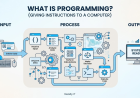
Coding is writing instructions.
Software engineering is much broader.
It involves:
-
Requirements
-
Architecture
-
Design
-
Coding
-
Testing
-
Version control
-
Deployment
-
Monitoring
-
Security
-
Maintenance
-
Collaboration
You can know how to code and still have a lot to learn about software engineering.
That's normal.
52. Learn Testing
Beginners often think:
“If it runs, it's correct.”
Unfortunately, software loves proving that statement wrong.
Learn:
-
Unit tests
-
Integration tests
-
End-to-end testing
-
Test cases
-
Edge cases
Even basic testing habits can significantly improve your development process.
53. Learn Debugging
Debugging is one of the most valuable skills you can develop.
When something breaks, don't immediately rewrite everything.
Ask:
-
What exactly is failing?
-
What did I expect?
-
What actually happened?
-
Where does the behavior change?
-
What does the error message tell me?
-
Can I reproduce it?
-
What is the smallest test that isolates the problem?
This mindset transfers across languages.
Python bug?
Same debugging mindset.
TypeScript bug?
Same mindset.
Java bug?
Same mindset.
C++ bug?
Same mindset.
Rust bug?
You guessed it.
54. Learn to Read Error Messages
This is particularly important with languages such as Rust, whose compiler can provide detailed feedback about problems. The official Rust learning material explicitly encourages developers to learn from compiler messages.
Beginners often see an error message and immediately panic.
Instead, read it.
Find:
-
Error type
-
File
-
Line number
-
Expected value
-
Actual value
-
Suggested fix
The compiler isn't insulting you.
It is giving you information.
Usually.
55. Don't Be Afraid of Being Bad at First
Programming feels difficult because you're learning several things at once.
You are learning:
-
A language
-
Problem solving
-
Tools
-
Debugging
-
Computer concepts
-
Technical vocabulary
-
Software architecture
Your brain is doing a lot.
So don't expect yourself to feel comfortable immediately.
The first stage often feels confusing.
Then patterns begin appearing.
Eventually you stop thinking:
“How do I write a loop?”
and start thinking:
“I need to iterate over this collection and transform each element.”
That's progress.
56. Consistency Beats Random Intensity
You don't need to code for 12 hours every day.
You need consistency.
Even:
1–2 focused hours a day
can become substantial over months.
A useful routine might be:
30 minutes
Learn a concept.
30 minutes
Solve problems.
60 minutes
Build something.
On weekends, spend more time on projects.
The exact schedule isn't important.
The consistency is.
57. Avoid the "Roadmap Addiction"
This is another funny trap.
You search:
“Best Python roadmap 2026.”
Then:
“Best web development roadmap.”
Then:
“Best DSA roadmap.”
Then:
“Best AI roadmap.”
Then:
“Best roadmap for roadmap.”
Eventually you are so busy researching the correct path that you haven't actually started walking.
A roadmap is useful.
But a mediocre roadmap that you actually follow is better than a perfect roadmap that stays bookmarked.
58. Don't Compare Your Chapter One With Someone Else's Chapter Twenty
You will see people online saying:
“I got my first internship at 18.”
“I built my startup at 19.”
“I solved 2,000 problems.”
“I contribute to major open-source projects.”
That's fine.
Their progress doesn't invalidate yours.
You don't know:
-
How long they've been learning
-
How much support they had
-
What background they came from
-
How much time they have
-
What resources they had
Use other developers for inspiration.
Don't use them as a measuring stick for your self-worth.
59. Don't Chase Every New Technology
Every few months, the internet discovers a new "must learn" technology.
You don't need to chase all of them.
Strong fundamentals survive trends.
If you understand:
-
Programming
-
Algorithms
-
Data structures
-
Databases
-
Networking
-
APIs
-
Git
-
Debugging
-
Software design
you can adapt to new tools.
Frameworks change.
Fundamentals remain.
60. The Same Principle Applies to AI
AI tools are evolving quickly.
You may hear:
“You don't need to code anymore.”
Then someone else says:
“You must learn AI.”
Then another person says:
“Learn prompt engineering.”
Don't let this noise destroy your fundamentals.
AI can make developers more productive.
But understanding software remains valuable.
If an AI-generated solution fails, someone needs to understand:
-
Why it failed
-
Whether the architecture is correct
-
Whether the code is secure
-
Whether the performance is acceptable
-
Whether the output is actually solving the problem
That someone should eventually be you.
61. Choose Your First Field
Let's make the decision easier.
If you love AI and mathematics
Explore:
Python → Mathematics → Statistics → Data → Machine Learning → Deep Learning
62. If You Love Building Websites
Explore:
HTML → CSS → JavaScript → TypeScript → React/Next.js → Backend → Database → Deployment
63. If You Love Competitive Programming
Explore:
C++ → DSA → Algorithms → Competitive Programming
You can later expand into:
-
Systems
-
Game development
-
Backend
-
Performance engineering
64. If You Want Enterprise Backend Development
Explore:
Java → OOP → SQL → Spring Boot → REST APIs → Databases → Testing → Deployment
65. If You Love Low-Level Systems
Explore:
C/C++ → Computer Architecture → Operating Systems → Networking → Rust → Systems Projects
Rust can then become particularly interesting because its design aims to combine low-level control with memory safety and modern tooling.
66. What If You Don't Know What You Like?
Then experiment.
Don't spend six months deciding.
Spend:
2–4 weeks exploring one area.
Build something tiny.
Then evaluate.
Did you enjoy it?
Were you curious?
Did you want to understand how things worked?
Did debugging feel satisfying or completely unbearable?
Try another area.
You are allowed to change your mind.
67. A 30-Day Beginner Experiment
Here's a simple approach.
Week 1 - Programming Fundamentals
Learn:
-
Variables
-
Types
-
Conditions
-
Loops
-
Functions
Write small programs every day.
Week 2 - Data and Logic
Learn:
-
Arrays/lists
-
Dictionaries/maps
-
Strings
-
Functions
-
Basic algorithms
Solve simple problems.
Week 3 - Build
Create a small application.
Don't follow a tutorial line by line.
Search only when stuck.
Week 4 - Improve
Add:
-
Better UI
-
Error handling
-
Persistence
-
Authentication if relevant
-
Tests
-
Documentation
Then publish it.
At the end of 30 days, you will know much more about whether you enjoy that field than you would from watching 30 hours of career videos.
68. The "Learn → Build → Share" Cycle
A powerful habit is:
Learn something.
↓
Build something.
↓
Share it.
Your sharing can be:
-
GitHub
-
LinkedIn
-
Personal website
-
Developer community
-
College community
You don't need to become an influencer.
Simply document your progress.
It can help you build:
-
Communication skills
-
Professional presence
-
Accountability
-
Portfolio material
69. Learn to Explain Your Projects
Imagine an interviewer asks:
“Tell me about your project.”
Don't say:
“I used React, Node, MongoDB, JWT, Docker and AWS.”
That's a technology list.
Instead say:
“I built a task management platform that allows teams to assign tasks, track progress, and manage roles. I designed the API, implemented authentication, created the database schema, and deployed the application.”
Now you are explaining a product.
Then explain the technical decisions.
That's much stronger.
70. Learn Why, Not Just How
Beginner:
“How do I create an API?”
Intermediate:
“How should I design this API?”
Advanced:
“Why should this API be designed this way?”
That progression matters.
Eventually you want to understand trade-offs.
For example:
Why PostgreSQL instead of MongoDB?
Why REST instead of another approach?
Why caching?
Why asynchronous processing?
Why a particular data structure?
Why one architecture over another?
That's engineering.
71. Don't Overengineer Beginner Projects
There's another trap.
You build a simple notes application.
Suddenly you have:
-
Kubernetes
-
Microservices
-
Redis
-
Kafka
-
GraphQL
-
Three databases
-
Event sourcing
-
Twelve Docker containers
Why?
Because you watched a video called:
"System Design of Netflix."
Your notes app has 14 users.
One of them is you.
Start simple.
Add complexity when the problem requires it.
72. Learn Complexity Through Real Projects
A simple project can teach you more than a theoretical lecture.
Suppose you build a search feature.
At first, you loop through every item.
Later you learn indexing.
Now you understand why databases use indexes.
Suppose you build a chat application.
Now you discover real-time communication.
You learn:
-
WebSockets
-
Connections
-
Events
-
Concurrency
Suddenly theoretical concepts have context.
73. Build Something That Makes You Curious
This is probably one of the best pieces of advice for beginners.
Don't build a project because a roadmap says:
"Project #4: Build a calculator."
Build something because you genuinely want to know:
"Can I make this work?"
Curiosity creates persistence.
74. What You Should NOT Do
Let's summarize the common mistakes.
Don't learn five languages simultaneously.
You will confuse syntax and dilute your focus.
Don't spend months only watching tutorials.
Build.
Don't copy projects blindly.
Understand them.
Don't ignore fundamentals.
Frameworks cannot replace programming knowledge.
Don't chase every trend.
Your fundamentals matter more.
Don't compare yourself constantly.
Measure your own progress.
Don't wait until you're perfect.
Publish imperfect projects.
Don't think one language guarantees a job.
Skills and practical ability matter.
Don't treat DSA as the entire industry.
It is one part of the ecosystem.
Don't treat a roadmap as a law.
Adjust it according to your goals.
75. The Most Important Career Formula
A useful mental model is:
Career Direction
↓
Programming Fundamentals
↓
Language
↓
Tools & Ecosystem
↓
Projects
↓
Problem Solving
↓
Real-World Experience
↓
Portfolio
↓
Internship / Job
The exact path can change.
But the underlying principle remains.
76. Python vs TypeScript vs C++ vs Java vs Rust
Let's compare them one more time.
| Language | Best Starting Areas | Difficulty for Beginners | Major Strength |
|---|---|---|---|
| Python | AI, ML, Data, Automation | Low | Simplicity + ecosystem |
| TypeScript | Web, Full-Stack | Medium | Modern web development + type system |
| C/C++ | DSA, Games, Systems | Medium–High | Performance + lower-level control |
| Java | Backend, Enterprise | Medium | Large ecosystem + OOP |
| Rust | Systems, Performance | High | Safety + performance |
This isn't a ranking.
It is a map.
And maps exist to help you choose a route.
77. Is Python the Best First Language?
Sometimes.
If you're completely new and want to learn programming fundamentals quickly, Python is a reasonable starting point.
If your goal is AI or data science, it becomes even more relevant.
But if your specific goal is modern web development, starting with the web ecosystem makes more sense.
If your university curriculum and placement preparation heavily revolve around C++, that might influence your choice.
If you're targeting enterprise Java development, Java may be the appropriate starting point.
There is no universal answer.
78. Should You Learn Multiple Languages?
Eventually, yes.
But not immediately.
A good progression is:
First
Become competent in one language.
Second
Learn another language that introduces a different programming model or ecosystem.
For example:
Python → TypeScript
or:
C++ → Rust
or:
Java → TypeScript
This lets you compare approaches.
You begin noticing:
“Oh, this language handles memory differently.”
“This type system catches this class of errors.”
“This ecosystem solves this problem differently.”
That comparison can make you a stronger programmer.
79. Don't Collect Languages Like Pokémon
You don't get bonus points because your resume contains 17 programming languages.
A developer who can solve problems and ship software is more valuable than someone who can say:
“I know the syntax of 12 languages.”
Language knowledge should serve your ability to build.
Not the other way around.
80. What Actually Makes Someone a Good Developer?
Not knowing every syntax rule.
A good developer can:
-
Understand a problem
-
Break it into smaller pieces
-
Research unknown concepts
-
Design a solution
-
Write code
-
Test it
-
Debug it
-
Explain it
-
Improve it
-
Maintain it
That is what you're really trying to develop.
81. Your First Year Doesn't Need to Look Perfect
If you're a college student, your first year of coding might look chaotic.
You may:
-
Learn Python
-
Try C++
-
Build a website
-
Get interested in AI
-
Try React
-
Quit React
-
Return to React
-
Discover Rust
-
Build something weird
-
Break your laptop environment
-
Fix it
-
Learn Git
-
Forget Git
-
Learn Git again
That's normal.
The goal isn't a perfectly linear journey.
The goal is increasing capability.
82. Learn From Your Mistakes
When something goes wrong, document it.
For example:
"I spent four hours debugging this because I forgot that the API returned an array instead of an object."
That's useful knowledge.
Over time, you develop your own mental database of mistakes.
Eventually you'll recognize problems faster.
83. Build a Personal Knowledge Base
Keep notes about:
-
Commands
-
Concepts
-
Bugs
-
Solutions
-
Architecture decisions
-
Useful documentation
-
Project ideas
Don't copy entire tutorials.
Write what you understood.
This makes revision much easier.
84. Learn the Basics of Linux
You don't need to become a Linux administrator.
But understanding:
-
Terminal
-
Files
-
Permissions
-
Processes
-
Environment variables
-
SSH
-
Package managers
-
Basic shell commands
will make many development workflows easier.
Eventually you'll encounter servers and deployment environments where these concepts become useful.
85. Learn Networking Basics
You don't need to become a network engineer.
But understand:
-
IP addresses
-
DNS
-
HTTP
-
HTTPS
-
TCP
-
Ports
-
Requests
-
Responses
-
Client/server architecture
If you're building web applications, these concepts become extremely useful.
86. Learn Security Basics
Even if you aren't becoming a cybersecurity engineer, understand basic security principles.
Learn about:
-
Password hashing
-
Authentication
-
Authorization
-
Input validation
-
SQL injection
-
XSS
-
CSRF
-
Secrets
-
HTTPS
-
Access control
Never assume:
"My application is small, so security doesn't matter."
Small applications can still leak data.
87. Learn to Use Databases Properly
Don't treat a database as a magical storage box.
Understand:
-
Schema
-
Relationships
-
Constraints
-
Indexes
-
Transactions
-
Queries
-
Migrations
Eventually you'll understand why poor database design can make an application slow and difficult to maintain.
88. Learn Testing and Code Quality
As your projects become larger, messy code becomes painful.
Learn:
-
Naming
-
Functions
-
Modular design
-
Reusability
-
Testing
-
Formatting
-
Linting
-
Documentation
The goal isn't to write "beautiful code."
The goal is to write code other humans can understand and safely modify.
89. Collaborate With Other Developers
At some point, stop building everything alone.
Join:
-
College clubs
-
Open-source projects
-
Hackathons
-
Developer communities
-
Startup teams
-
Coding competitions
Collaboration teaches things tutorials can't.
You learn:
-
Git workflows
-
Code reviews
-
Communication
-
Conflicts
-
Requirements
-
Team conventions
That's real engineering experience.
90. Hackathons Are Useful for Learning
Hackathons can teach you how to:
-
Move quickly
-
Work with APIs
-
Divide tasks
-
Build under pressure
-
Present products
-
Solve ambiguous problems
Don't worry if your first hackathon project is held together by questionable code and caffeine.
That's practically a tradition.
91. Open Source Can Accelerate Your Learning
Once you're comfortable enough, try contributing to open source.
You don't need to immediately fix a 5,000-line compiler bug.
Start with:
-
Documentation
-
Small fixes
-
Tests
-
Typo corrections
-
Beginner-friendly issues
Then gradually increase complexity.
You learn how real projects are structured.
92. Internships Should Be a Goal, Not an Obsession
An internship can be valuable because it exposes you to real development.
But don't think:
"I need an internship before I can build real projects."
Reverse that.
Build real projects first.
Then use those projects to improve your chances of getting an internship.
93. Don't Wait for College to Teach You Everything
College can provide:
-
Fundamentals
-
Theory
-
Assignments
-
Exams
-
Peer groups
But software development changes quickly.
Self-learning is part of the profession.
You will always encounter something you don't know.
That's normal.
The skill is learning how to learn.
94. Your Learning Process Will Never Be Finished
Even senior engineers constantly learn.
New:
-
Libraries
-
APIs
-
Frameworks
-
Languages
-
Security issues
-
Infrastructure tools
-
Development practices
appear all the time.
So don't aim for:
"I want to finish coding."
You don't finish coding.
You become better at learning.
95. The Most Important Skill: Problem Solving
Languages change.
Problem-solving remains.
Suppose your application is slow.
You need to investigate.
Suppose users can't log in.
You debug.
Suppose the database is overloaded.
You analyze.
Suppose your algorithm is too slow.
You optimize.
Programming is essentially a long series of:
"Something isn't working. Why?"
And gradually becoming better at answering that question.
96. What Your First 6 Months Could Look Like
Here's one possible structure.
Month 1
Programming fundamentals.
Month 2
Language fundamentals + small problems.
Month 3
First serious project.
Month 4
Git + APIs + databases.
Month 5
Second serious project + DSA.
Month 6
Portfolio + deployment + internship preparation.
Your timeline can be slower or faster.
The exact calendar doesn't matter.
Progress does.
97. What Your First Year Could Look Like
By the end of a strong first year, you ideally want:
-
One primary language
-
Strong programming fundamentals
-
Basic DSA
-
Git/GitHub
-
At least 3–5 meaningful projects
-
Basic database knowledge
-
API knowledge
-
Basic deployment knowledge
-
A portfolio
-
Some collaboration experience
-
An understanding of your preferred field
That's much more valuable than simply saying:
"I completed 14 courses."
98. What If You Learn the Wrong Language?
You probably won't ruin your career.
That's another fear beginners have.
You spend six months learning Java and then realize you want web development.
Did you waste everything?
No.
You learned:
-
Programming
-
Logic
-
Debugging
-
Data structures
-
Functions
-
OOP
-
Problem solving
Those skills transfer.
Your next language will usually be easier because you already understand programming concepts.
99. Your First Language Is a Door, Not a Prison
Think of programming languages as doors.
Python opens certain doors.
TypeScript opens others.
C++ opens others.
Java opens others.
Rust opens others.
You don't have to live inside the first room forever.
Choose a door that leads somewhere you actually want to explore.
100. The Final Lesson
If there is one idea you remember from this entire article, remember this:
Don't ask:
"Which programming language should I learn?"
Ask:
"What do I want to build?"
Then:
"What career field matches that?"
Then:
"Which language and technologies are relevant to that field?"
Then:
"What should I build to prove I can do it?"
That is a much better way to approach a coding career.
Conclusion
Starting a coding career can feel overwhelming because there are too many choices.
Python.
TypeScript.
C++.
Java.
Rust.
React.
Django.
Spring.
Node.js.
Docker.
AWS.
Git.
DSA.
AI.
Cloud.
Cybersecurity.
The list never ends.
And if you try to learn everything at once, you will probably end up knowing a little about everything and not being particularly useful at anything.
Instead, simplify the process.
Choose a direction.
Then choose a language.
Learn the fundamentals.
Build projects.
Solve problems.
Learn Git.
Understand databases and APIs.
Learn how software gets deployed.
Use documentation.
Use AI intelligently.
Work with other developers.
Build things that solve real problems.
And keep going.
Python can be an excellent choice for AI, machine learning, data science, automation, and many other applications.
TypeScript can be an excellent direction for developers interested in modern JavaScript-based applications and larger web projects where its type system provides additional structure.
C and C++ can be valuable when performance, systems concepts, game development, or competitive programming are part of your goals.
Java remains a strong option for developers interested in object-oriented programming, backend systems, and enterprise software, with a large ecosystem and extensive official learning resources.
Rust is an increasingly interesting choice for developers interested in systems programming, performance, memory safety, and low-level software. Its official learning ecosystem includes the Rust Book, Rust by Example, Rustlings, and documentation for tools such as Cargo.
But none of these languages is going to magically give you a career.
You build the career.
The language is just one of the tools.
So don't spend the next six months asking:
"Which language is best?"
Choose a direction.
Pick a language.
Write your first program.
Build your first project.
Break it.
Fix it.
Build another.
Then another.
Eventually, the question won't be:
"How do I start coding?"
It will be:
"What should I build next?"
And honestly, that's a much better problem to have.
A Simple Roadmap to Remember
1. Choose your field
↓
2. Pick one relevant language
↓
3. Learn programming fundamentals
↓
4. Practice problem solving
↓
5. Build small projects
↓
6. Learn Git & GitHub
↓
7. Learn databases and APIs
↓
8. Build real-world projects
↓
9. Deploy your work
↓
10. Create your portfolio
↓
11. Apply for internships/jobs
↓
12. Keep learning
Because the goal isn't to know every programming language.
The goal is to become someone who can look at a problem and say:
"Okay. Let's build it."
Final takeaway
Python isn't going to ruin your career. C++ isn't going to guarantee you a job. Java isn't outdated just because it's old. Rust isn't automatically better because it's difficult. TypeScript isn't useful simply because it's trending.
The right language is the one that helps you move toward the work you actually want to do.
Choose the destination first. Then choose the vehicle.
That is how you should start your coding career.
What's Your Reaction?
 Like
2
Like
2
 Dislike
0
Dislike
0
 Love
1
Love
1
 Funny
0
Funny
0
 Angry
0
Angry
0
 Sad
0
Sad
0
 Wow
1
Wow
1

-
 Kashish YadavNeed a roadmap for data analyst