

















Python Dictionary Tutorial with Examples
Learn Python Dictionaries with methods, examples, loops, and real-world use cases in this beginner-friendly 2026 guide.
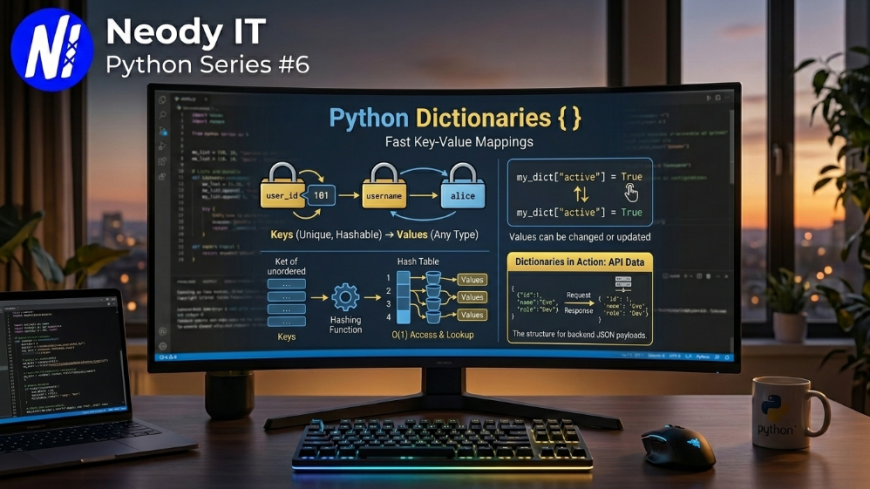
Python Dictionary Explained with Examples (2026 Guide)
Python Series #6
Python Dictionaries are one of the most powerful and frequently used data structures in Python programming. From APIs and backend systems to AI applications and automation scripts, dictionaries are used almost everywhere in modern software development.
In this tutorial by Neody IT, you will learn Python Dictionaries from beginner to intermediate level with real examples, important methods, practical use cases, and developer best practices.
Introduction
Imagine building:
-
A login system
-
A chatbot
Also Read → Python Loops Tutorial with Examples -
A student management app
-
An eCommerce website
-
A weather API
-
An AI recommendation engine
All these applications need a way to store data in key-value format.
That is exactly where Python Dictionaries become useful.
Many beginners struggle with:
-
Understanding key-value pairs
-
Accessing dictionary values
-
Updating data
-
Looping through dictionaries
-
Nested dictionaries
-
Dictionary methods
This guide explains everything step by step using simple language and practical coding examples.
At Neody IT, dictionaries are heavily used in backend APIs, AI integrations, JSON handling, and scalable web applications.
What is a Dictionary in Python?
A Dictionary is an unordered, mutable collection of key-value pairs.
Each value is connected to a unique key.
Example:
student = {
    "name": "Mayank",
    "age": 21,
    "course": "Python"
}

print(student)
Output
{'name': 'Mayank', 'age': 21, 'course': 'Python'}
Why Dictionaries Matter
Dictionaries are widely used because they allow:
-
Fast data access
-
Structured data storage
-
Easy updates
-
Real-world object representation
They are commonly used in:
-
APIs
-
JSON data
-
Machine Learning
-
Web development
-
Database responses
-
Authentication systems
-
AI applications
Prerequisites
Before starting this tutorial, you should know:
Tools Required
-
Python 3.12+
-
VS Code or PyCharm
-
Terminal or Command Prompt
Setting Up the Environment
Step 1: Create Python File
dictionary_tutorial.py
Run the file:
python dictionary_tutorial.py
Creating Dictionaries
Basic Dictionary
car = {
    "brand": "Tesla",
    "model": "Model 3",
    "year": 2026
}

print(car)
Accessing Dictionary Values
Using Keys
student = {
    "name": "Aman",
    "marks": 92
}

print(student["name"])
print(student["marks"])
Output
Aman
92
Using get() Method
The get() method is safer than direct access.
print(student.get("name"))
Why get() is Useful
If a key does not exist:
-
Direct access gives error
-
get()returns None
Example:
print(student.get("email"))
Output
None
Adding Items to Dictionary
user = {
    "name": "Rahul"
}

user["age"] = 22

print(user)
Output
{'name': 'Rahul', 'age': 22}
Updating Dictionary Values
user["age"] = 25

print(user)
Removing Items from Dictionary
pop()
Removes specific key.
employee = {
    "name": "Karan",
    "salary": 50000
}

employee.pop("salary")

print(employee)
del Keyword
data = {
    "city": "Delhi",
    "state": "Delhi"
}

del data["state"]

print(data)
clear()
Removes all items.
data.clear()

print(data)
Important Dictionary Methods
keys()
Returns all keys.
person = {
    "name": "Priya",
    "age": 20
}

print(person.keys())
values()
Returns all values.
print(person.values())
items()
Returns key-value pairs.
print(person.items())
update()
Updates dictionary using another dictionary.
student = {
    "name": "Rohit"
}

student.update({
    "marks": 88,
    "city": "Mumbai"
})

print(student)
copy()
Creates a copy of dictionary.
original = {
    "language": "Python"
}

duplicate = original.copy()

print(duplicate)
Looping Through Dictionaries
Loop Through Keys
student = {
    "name": "Aman",
    "age": 21
}

for key in student:
    print(key)
Loop Through Values
for value in student.values():
    print(value)
Loop Through Key-Value Pairs
for key, value in student.items():
    print(key, value)
Nested Dictionaries
A dictionary inside another dictionary is called a nested dictionary.
students = {
    "student1": {
        "name": "Aman",
        "marks": 90
    },

    "student2": {
        "name": "Priya",
        "marks": 95
    }
}

print(students)
Access Nested Dictionary Values
print(students["student1"]["name"])
Output
Aman
Dictionary Comprehension
Dictionary comprehension provides a shorter syntax.
squares = {x: x*x for x in range(5)}

print(squares)
Output
{0: 0, 1: 1, 2: 4, 3: 9, 4: 16}
Real World Use Cases
APIs and JSON Data
Most APIs return dictionary-like data.
Example:
response = {
    "status": "success",
    "message": "Data fetched"
}
User Profiles
user = {
    "username": "mayank_dev",
    "followers": 1200,
    "verified": True
}
AI and Machine Learning
Dictionaries are used for:
-
Model configurations
-
Data mapping
-
Feature storage
-
NLP processing
Backend Development
Frameworks like:
-
Django
-
Flask
-
FastAPI
heavily rely on dictionaries for request and response handling.
At Neody IT, dictionaries are frequently used in backend systems and AI automation projects.
Common Errors and Fixes
KeyError
Occurs when accessing missing key.
Example:
student = {
    "name": "Aman"
}

print(student["age"])
Fix
Use get() instead.
print(student.get("age"))
Modifying Dictionary During Loop
Bad Example:
for key in student:
    del student[key]
This can cause runtime errors.
Best Practices
Use Meaningful Keys
Bad:
data = {
    "a": "Mayank"
}
Better:
data = {
    "username": "Mayank"
}
Avoid Deep Nesting
Too many nested levels make code difficult to manage.
Use get() for Safer Access
Recommended for production-level applications.
Keep Data Structured
Group related information together logically.
Advanced Tips
Merging Dictionaries
a = {"name": "Aman"}
b = {"age": 21}

merged = a | b

print(merged)
Sorting Dictionary
marks = {
    "A": 90,
    "B": 70,
    "C": 85
}

sorted_marks = dict(sorted(marks.items()))

print(sorted_marks)
Convert Dictionary to JSON
import json

data = {
    "name": "Neody IT"
}

json_data = json.dumps(data)

print(json_data)
This is extremely useful in APIs and web development.
Future Scope and Industry Trends
Python Dictionaries remain one of the most essential concepts in:
-
AI Engineering
-
Backend Development
-
Data Science
-
Cloud Applications
-
Automation Systems
With the rise of:
-
AI agents
-
Large Language Models
-
API-driven systems
-
Cloud-native apps
dictionary-based data handling has become even more important.
Modern frameworks and technologies heavily depend on structured key-value data.
At Neody IT, dictionaries are commonly used in:
-
REST APIs
-
AI integrations
-
Admin dashboards
-
Authentication systems
-
Workflow automation tools
Developers who master dictionaries build cleaner and more scalable Python applications.
Frequently Asked Questions (FAQ)
What is a dictionary in Python?
A dictionary is a mutable collection that stores data using key-value pairs.
Are dictionaries ordered in Python?
Yes. Since Python 3.7, dictionaries maintain insertion order.
Can dictionary keys be duplicated?
No. Keys must be unique.
Can dictionaries store lists?
Yes.
Example:
data = {
    "numbers": [1, 2, 3]
}
What is the difference between List and Dictionary?
Lists use indexes while dictionaries use keys.
Why are dictionaries fast?
Python dictionaries use hash tables internally, making lookups very fast.
Can dictionaries contain nested dictionaries?
Yes. Nested dictionaries are commonly used in APIs and JSON structures.
Final Thoughts
Python Dictionaries are one of the most powerful and practical data structures in Python.
In this tutorial, you learned:
-
What dictionaries are
-
How key-value pairs work
-
Important dictionary methods
-
Looping techniques
-
Nested dictionaries
-
Dictionary comprehension
-
Real-world use cases
-
Best practices
Mastering dictionaries is essential for:
-
Backend development
-
AI systems
-
Automation
-
Data processing
If you want to become a professional Python developer in 2026, understanding dictionaries properly is extremely important.
CTA
Explore more Python tutorials, AI guides, and developer resources on Neody IT.
Follow Neody IT for modern programming tutorials, backend development insights, and AI-focused coding content.
What's Your Reaction?
 Like
0
Like
0
 Dislike
0
Dislike
0
 Love
0
Love
0
 Funny
0
Funny
0
 Angry
0
Angry
0
 Sad
0
Sad
0
 Wow
0
Wow
0