

























Python Lists and Tuples Tutorial with Examples
Learn Python Lists and Tuples with examples, methods, and real use cases in this beginner-friendly 2026 guide.
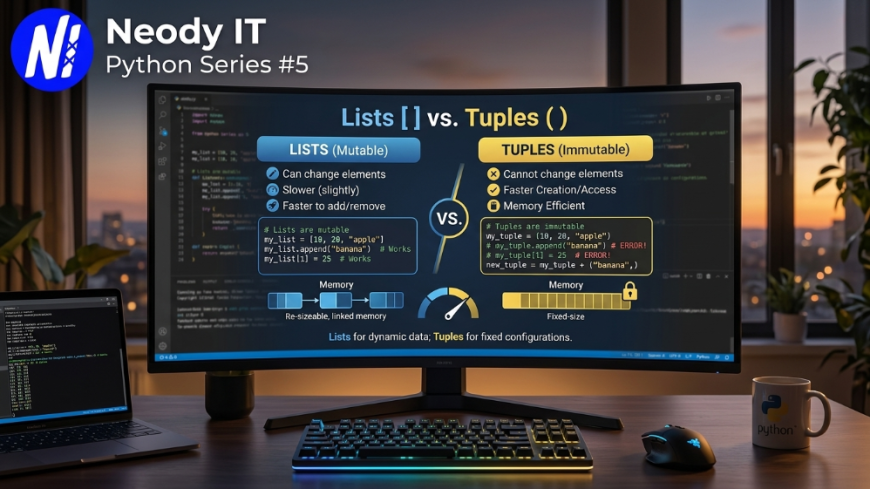
Python Lists and Tuples Explained with Examples (2026 Guide)
Python Series #5
Python lists and tuples are among the most important data structures every developer should understand. Whether you are building AI applications, automation scripts, backend systems, or web applications, these two concepts appear almost everywhere in Python development.
In this guide by Neody IT, you will learn Python Lists and Tuples from beginner to intermediate level with real examples, methods, practical use cases, and coding best practices.
Introduction
If you are learning Python in 2026, one of the first real programming skills you need is handling collections of data efficiently.
Imagine building:
-
A student management system
Also Read → Python Loops Tutorial with Examples -
An AI chatbot
-
A weather application
-
A shopping cart
-
A social media platform
All these systems need a way to store multiple values together. That is where Lists and Tuples become essential.
Many beginners get confused between:
-
List vs Tuple
-
Mutable vs Immutable
-
Which methods to use
-
Performance differences
-
Real-world usage scenarios
This tutorial solves all of that step by step with clean examples and practical explanations.
At Neody IT, we regularly use Python Lists and Tuples while developing AI integrations, backend APIs, data processing systems, and automation tools.
What are Python Lists and Tuples?
Python List
A List is an ordered, mutable collection in Python.
Mutable means:
You can change, add, remove, or update items after creation.
Example:
fruits = ["Apple", "Banana", "Mango"]
print(fruits)
Output
['Apple', 'Banana', 'Mango']
Lists use square brackets [].
Python Tuple
A Tuple is an ordered but immutable collection.
Immutable means:
Once created, items cannot be modified.
Example:
colors = ("Red", "Blue", "Green")
print(colors)
Output
('Red', 'Blue', 'Green')
Tuples use parentheses ().
Why Lists and Tuples Matter
Lists and tuples are used heavily in:
-
Data Science
-
Machine Learning
-
Web Development
-
AI systems
-
APIs
-
Automation scripts
-
Database operations
-
Cloud applications
Without understanding them properly, advanced Python development becomes difficult.
Prerequisites
Before starting this tutorial, you should know:
-
Basic Python syntax
-
Variables
-
print() function
-
Basic input/output
Tools Required
-
Python 3.12 or later
-
VS Code or PyCharm
-
Terminal or Command Prompt
Setting Up Python Environment
Step 1: Install Python
Download Python from the official website.
Verify installation:
python --version
Output
Python 3.12.0
Step 2: Create a Python File
Create a file:
list_tuple_tutorial.py
Run the file:
python list_tuple_tutorial.py
Python Lists Explained
Creating Lists
numbers = [1, 2, 3, 4, 5]
names = ["Rahul", "Aman", "Priya"]
mixed = [1, "Python", True, 9.5]

print(numbers)
print(names)
print(mixed)
Explanation
Lists can store:
-
Integers
-
Strings
-
Boolean values
-
Floating point numbers
-
Even other lists
This flexibility makes lists powerful.
Accessing List Elements
languages = ["Python", "Java", "C++", "JavaScript"]

print(languages[0])
print(languages[2])
Output
Python
C++
Important Note
Python indexing starts from 0.
Negative Indexing
print(languages[-1])
Output
JavaScript
Negative indexing accesses elements from the end.
Python List Methods
append()
Adds a single item to the end.
students = ["Aman", "Rohit"]

students.append("Karan")

print(students)
Output
['Aman', 'Rohit', 'Karan']
extend()
Adds multiple items.
numbers = [1, 2]

numbers.extend([3, 4, 5])

print(numbers)
insert()
Adds an item at a specific index.
cars = ["BMW", "Audi"]

cars.insert(1, "Tesla")

print(cars)
remove()
Removes a specific item.
fruits = ["Apple", "Banana", "Mango"]

fruits.remove("Banana")

print(fruits)
Common Mistake
Removing a value that does not exist causes an error.
pop()
Removes item using index.
numbers = [10, 20, 30]

numbers.pop(1)

print(numbers)
clear()
Removes all items.
data = [1, 2, 3]

data.clear()

print(data)
index()
Returns position of an item.
cities = ["Delhi", "Mumbai", "Pune"]

print(cities.index("Mumbai"))
count()
Counts occurrences.
nums = [1, 2, 2, 3, 2]

print(nums.count(2))
sort()
Sorts the list.
marks = [50, 90, 70, 30]

marks.sort()

print(marks)
reverse()
Reverses the list.
marks.reverse()

print(marks)
copy()
Creates a copy of the list.
a = [1, 2, 3]

b = a.copy()

print(b)
List Slicing
numbers = [1, 2, 3, 4, 5, 6]

print(numbers[1:4])
Output
[2, 3, 4]
Nested Lists
matrix = [
    [1, 2],
    [3, 4]
]

print(matrix[1][0])
Output
3
Nested lists are heavily used in:
-
AI models
-
Game development
-
Data structures
-
Data analysis
Python Tuples Explained
Creating Tuples
countries = ("India", "USA", "Japan")

print(countries)
Accessing Tuple Elements
print(countries[0])
Tuple Methods
Tuples have fewer methods because they are immutable.
count()
Counts occurrences.
data = (1, 2, 2, 3)

print(data.count(2))
index()
Returns index position.
languages = ("Python", "Java", "C++")

print(languages.index("Java"))
Why Tuples are Faster
Tuples consume less memory and are faster because they cannot be modified.
This is useful for:
-
Fixed configurations
-
Coordinates
-
Database records
-
API responses
List vs Tuple
| Feature | List | Tuple |
|---|---|---|
| Mutable | Yes | No |
| Syntax | [] | () |
| Faster | No | Yes |
| Memory Efficient | Less | More |
| Methods | More | Fewer |
Real World Use Cases
Lists in Real Projects
Lists are used for:
-
Shopping carts
-
User comments
-
Notifications
-
API data
-
AI datasets
Example:
cart_items = ["Laptop", "Mouse", "Keyboard"]
Tuples in Real Projects
Tuples are used for:
-
GPS coordinates
-
Fixed settings
-
Database rows
-
RGB color values
Example:
location = (28.7041, 77.1025)
Common Errors and Fixes
Error: Index Out of Range
numbers = [1, 2]

print(numbers[5])
Fix
Always check list length before accessing.
print(len(numbers))
Error: Tuple Object Does Not Support Item Assignment
data = (1, 2, 3)

data[0] = 10
Why This Happens
Tuples are immutable.
Best Practices
Use Lists When Data Changes Frequently
Good for:
-
Dynamic applications
-
User-generated content
-
APIs
Use Tuples for Fixed Data
Good for:
-
Configuration values
-
Coordinates
-
Read-only data
Keep Lists Clean
Avoid storing unrelated data types unnecessarily.
Bad:
data = [1, "Hello", True, 5.5]
Better:
scores = [80, 90, 70]
Advanced Tips
List Comprehension
A faster and cleaner way to create lists.
squares = [x*x for x in range(5)]

print(squares)
Output
[0, 1, 4, 9, 16]
Tuple Packing and Unpacking
person = ("Mayank", 21)

name, age = person

print(name)
print(age)
This technique is widely used in backend systems and APIs.
Future Scope and Industry Trends
Python continues to dominate:
-
AI development
-
Automation
-
Data Science
-
Backend systems
-
Cloud engineering
Understanding Lists and Tuples is foundational for:
-
Machine Learning
-
Deep Learning
-
FastAPI
-
Django
-
AI agents
-
Data analytics
At Neody IT, Python data structures are commonly used in AI integrations, automation systems, and scalable backend applications.
In 2026, developers who understand clean data handling concepts will have stronger opportunities in:
-
AI engineering
-
Backend development
-
SaaS startups
-
Cloud platforms
-
Automation industries
Frequently Asked Questions (FAQ)
What is the difference between List and Tuple in Python?
Lists are mutable while tuples are immutable. Lists can be modified after creation, but tuples cannot.
Which is faster: List or Tuple?
Tuples are generally faster and more memory efficient than lists.
Can a tuple contain a list?
Yes.
Example:
data = ([1, 2], [3, 4])
When should I use tuples?
Use tuples when the data should remain constant and unchanged.
Are lists ordered in Python?
Yes. Lists maintain insertion order.
Can lists store different data types?
Yes. Lists can store mixed data types.
Is tuple better for security?
Tuples are safer for fixed data because they cannot be modified accidentally.
Final Thoughts
Python Lists and Tuples are essential building blocks for every Python developer.
In this tutorial, you learned:
-
How lists work
-
How tuples work
-
Important methods
-
Real-world examples
-
Best practices
-
Common mistakes
-
Performance differences
Mastering these concepts will make learning advanced Python topics much easier, including:
-
Data Structures
-
APIs
-
Machine Learning
-
Automation
-
Backend Development
If you are serious about becoming a Python developer in 2026, understanding Lists and Tuples properly is non-negotiable.
CTA
Explore more Python tutorials, programming guides, and developer resources on Neody IT.
Follow Neody IT for practical coding tutorials, AI development insights, and modern software engineering content.
What's Your Reaction?
 Like
1
Like
1
 Dislike
0
Dislike
0
 Love
1
Love
1
 Funny
0
Funny
0
 Angry
0
Angry
0
 Sad
0
Sad
0
 Wow
1
Wow
1