




















Python Variables, Data Types and Input Explained for Beginners
Learn Python variables, data types, operators and user input in this beginner friendly guide. Understand typecasting and Python basics with Neody IT.
Variables, Data Types and Input in Python
Python Beginner Guide | Python Series #3 by Neody IT
Programming becomes truly interesting when your programs start working with real data. In the previous articles of the Neody IT Python learning series, we explored what programming is, why Python is widely used, and how to work with modules, pip, and comments. Those concepts helped us understand the environment in which Python programs run.
Now it is time to move one step further and explore how Python programs actually store and manipulate data.
Every program, whether it is a small calculator or a large application like Instagram or Netflix, works with values and information. These values must be stored somewhere so the program can process them. This is where variables and data types in Python come into play.
In this beginner friendly guide by Neody IT, we will explore the following essential concepts:
Variables in Python
Data types and how Python identifies them
Operators used in Python programs
Type conversion or typecasting
Taking input from the user
Understanding these topics is important because they form the foundation of almost every Python program you will write.
What is a Variable in Python
When writing programs, you often need to store values such as numbers, text, or other types of data. In Python, this is done using variables.
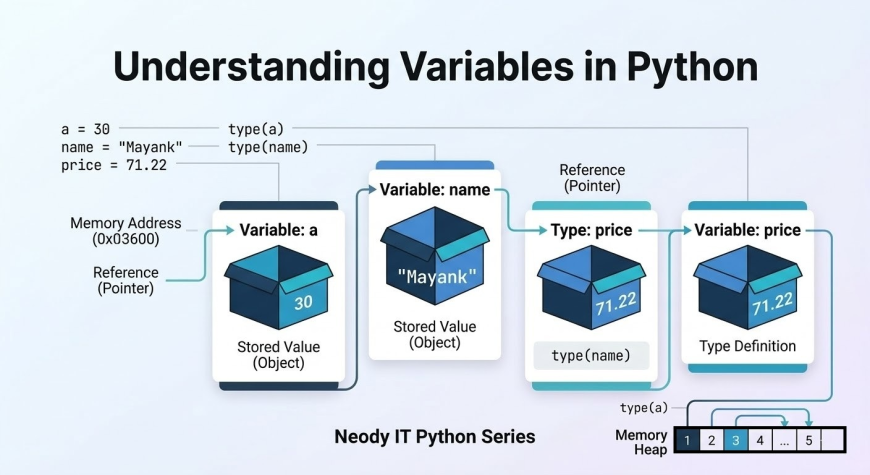
A variable is the name given to a memory location that stores a value. You can think of a variable as a container that holds data. The name of the container allows the program to access and use the stored value whenever needed.
For example, consider the following Python code:
a = 30
b = "Mayank"
c = 71.22
In this example:
a stores the value 30, which is an integerb stores the text "Mayank", which is a stringc stores 71.22, which is a floating point number
One interesting feature of Python is that you do not need to declare the type of a variable manually. Python automatically detects the type of data stored in a variable. This behavior is called dynamic typing and it makes Python much easier for beginners to learn.
At Neody IT, we always recommend beginners practice assigning values to variables because it helps build a strong understanding of how programs handle data.
Understanding Identifiers in Python
In Python programming, names given to variables, functions, classes, or other objects are called identifiers.
Identifiers help programmers refer to data and operations within their programs. Choosing clear and meaningful identifiers is an important part of writing readable code.
For example:
age
student_name
totalMarks
price
Each of these identifiers describes the purpose of the variable. When someone reads the code, they can easily understand what the variable represents.
Good naming practices improve code readability and make collaboration easier in large software projects.
Rules for Naming Variables in Python
Python has specific rules that programmers must follow when naming variables or identifiers.
First, a variable name can contain letters, numbers, and underscores.
Second, a variable name must start with either a letter or an underscore.
Third, variable names cannot start with a digit.
Fourth, spaces are not allowed in variable names.
Finally, Python keywords cannot be used as variable names.
Examples of valid variable names include:
Mayank
one8
seven
_seven
Examples of invalid variable names include:
1name
student name
class
These rules exist to ensure that Python programs remain structured and easy to interpret by the interpreter.
What are Data Types in Python
A data type defines the kind of value stored in a variable. In other words, the data type tells Python what type of data it is working with.
For example:
a = 71
b = 88.44
name = "Mayank"
Python automatically identifies the type of each value.
71 is treated as an integer
88.44 is treated as a floating point number
"Mayank" is treated as a string
This automatic detection of data types is one of the reasons Python is considered a beginner friendly programming language.
Understanding data types is important because different types of data behave differently during operations.
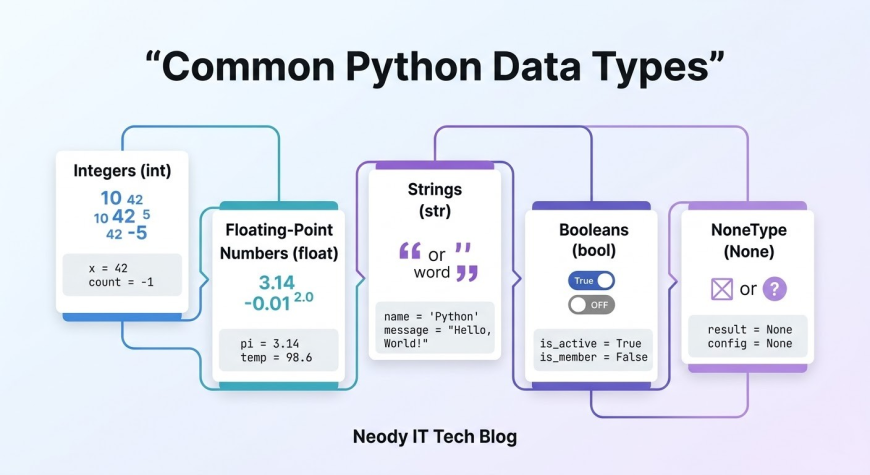
Common Data Types in Python
Python supports many types of data, but beginners usually start with a few fundamental ones.
Integers
Integers represent whole numbers without decimals.
Example:
age = 25
Some examples of integers include:
1
100
-5
Integers are commonly used for counting, indexing, and mathematical operations.
Floating Point Numbers
Floating point numbers represent numbers with decimal points.
Example:
price = 99.99
Examples include:
2.5
88.44
0.75
These values are often used in financial calculations, scientific computations, and measurements.
Strings
Strings represent text data. In Python, strings are enclosed within quotation marks.
Example:
name = "Mayank"
Examples of strings include:
"Python"
"Programming"
"Neody IT"
Strings are widely used for handling user input, messages, file names, and web data.
Boolean
Boolean values represent either True or False.
Example:
is_student = True
Booleans are commonly used in decision making within programs.
For example, a program may check whether a user is logged in or whether a number is greater than another.
None
The value None represents the absence of a value.
Example:
result = None
It indicates that a variable currently does not hold any meaningful data.
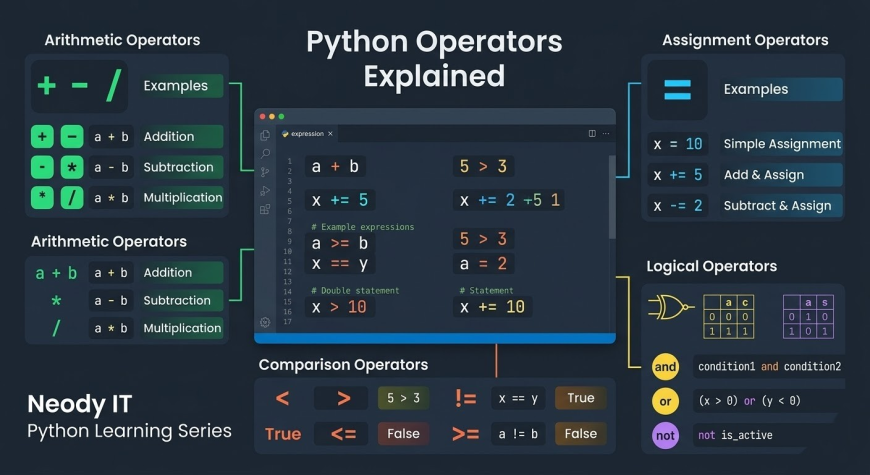
Operators in Python
Operators are symbols used to perform operations on variables and values. They allow programs to perform calculations, comparisons, and logical operations.
Python supports several types of operators.
Arithmetic Operators
Arithmetic operators are used for mathematical calculations.
Common arithmetic operators include:
-
addition
-
subtraction
-
multiplication
/ division
Example:
a = 10
b = 5
print(a + b)
This program prints the result of adding two numbers.
Assignment Operators
Assignment operators are used to assign values to variables.
Examples include:
=
+=
-=
Example:
x = 10
x += 5
This increases the value of x by 5.
Comparison Operators
Comparison operators compare two values and return either True or False.
Examples include:
==
=
<
!=
Example:
5 > 3
This expression evaluates to True.
Comparison operators are frequently used in decision making within programs.
Logical Operators
Logical operators are used to combine conditions.
Common logical operators include:
and
or
not
Example:
True and False
Logical operators are essential when building complex conditions in programs.
Checking Data Types with type()
Python provides a built in function called type() that allows programmers to check the data type of a variable.
Example:
a = 31
type(a)
Python returns:
Another example:
b = "31"
type(b)
Here Python identifies the value as a string.
This function is useful when debugging programs or verifying data types during development.
Typecasting in Python
Sometimes you may need to convert one data type into another. This process is called typecasting.
Typecasting is commonly used when dealing with user input or performing mathematical operations.
For example, converting an integer into a string:
str(31)
Converting a string into an integer:
int("32")
Converting an integer into a floating point number:
float(32)
Typecasting helps ensure that operations are performed correctly between different types of data.
Numeric Literal vs String Literal
Understanding the difference between numeric and string literals is important.
For example:
31 is a numeric literal because it represents a number.
"31" is a string literal because it represents text.
Although they look similar, Python treats them differently.
Numeric literals can be used in mathematical operations, while string literals cannot unless converted.
Taking Input from the User in Python
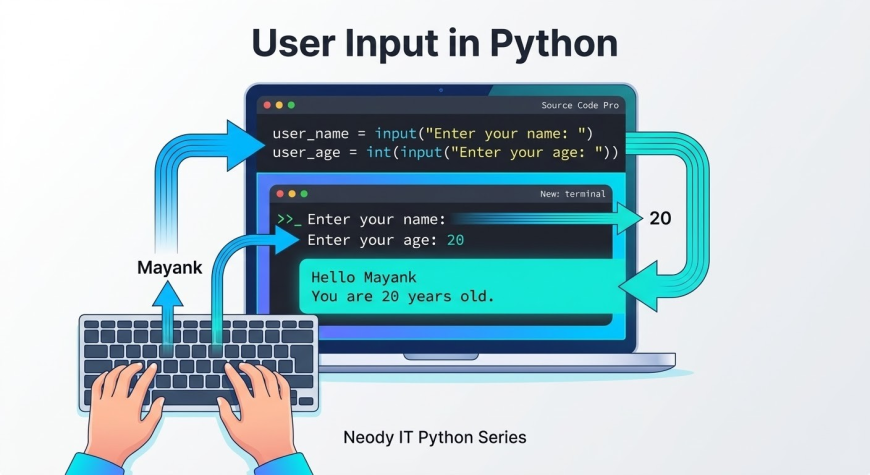
Programs often need to interact with users. Python provides the input() function to collect data from the keyboard.
Example:
name = input("Enter your name: ")
When this program runs, it pauses and waits for the user to type something. Whatever the user types becomes the value stored in the variable.
This feature allows developers to create interactive programs.
Important Rule of input()
One important thing to remember is that the input() function always returns a string.
For example:
age = input("Enter age: ")
Even if the user types the number 25, Python treats it as the string "25".
To perform numeric calculations, you must convert it into an integer.
Example:
age = int(input("Enter age: "))
This converts the input string into an integer value.
Practical Example Program
Let us create a simple interactive Python program.
name = input("Enter your name: ")
age = int(input("Enter your age: "))

print("Hello", name)
print("You are", age, "years old")
In this program:
The user enters their name and age
The program stores the values in variables
The program prints a personalized message
This is a simple example of how variables, data types, and user input work together in a real program.
Best Practices for Python Beginners
When learning Python programming, following some simple practices can help improve your coding skills.
Use meaningful variable names that clearly describe the stored value.
Understand the difference between numbers and strings before performing operations.
Practice writing small programs regularly.
Experiment with Python's interactive environment to test ideas quickly.
Focus on understanding programming logic rather than memorizing syntax.
At Neody IT, we always encourage beginners to learn by building small projects because practical experience is the best way to master programming.
Conclusion
In this article of the Neody IT Python learning series, we explored some of the most important concepts in Python programming.
We learned that variables store values in memory and allow programs to access data easily.
We also explored data types such as integers, floating point numbers, strings, booleans, and None.
Operators allow programs to perform mathematical and logical operations, while the type() function helps identify the data type of variables.
We also saw how typecasting converts data from one type to another and how the input() function enables programs to interact with users.
These concepts are the building blocks of almost every Python program.
In the next article of the Neody IT Python Series, we will explore strings, string methods, and text manipulation in Python, which will allow you to work with text data more effectively.
If you want to continue learning Python step by step, stay connected with the Neody IT Tech Blog for more practical programming tutorials and developer guides.
What's Your Reaction?
 Like
0
Like
0
 Dislike
0
Dislike
0
 Love
0
Love
0
 Funny
0
Funny
0
 Angry
0
Angry
0
 Sad
0
Sad
0
 Wow
0
Wow
0