





























Data Cleaning Guide for Beginners in Data Analytics
Learn what data cleaning is, why it matters, and how to fix missing values, duplicates, and formatting errors. A beginner friendly data cleaning guide by Neody IT for data analytics and machine learning learners.

Data Cleaning: A Beginner Guide to Preparing Data for Accurate Analysis
In the world of Data Analytics and Machine Learning, data is the foundation of everything. However, real world datasets are rarely perfect. They often contain missing values, duplicate records, formatting issues, and incorrect entries.
If analysts start working with such data without cleaning it first, the results of their analysis can become misleading or completely wrong.
This is why data cleaning is considered one of the most important steps in the data analysis workflow.
At Neody IT, we often explain to beginners that working with data is not only about building models or creating visualizations. A large portion of a data analyst’s time is spent preparing and cleaning data before analysis even begins.
In this beginner guide, we will explain what data cleaning is, why it is important, common data problems analysts face, and how to clean datasets step by step.
Why Data Cleaning Matters
Most beginners assume that datasets are always clean and ready for analysis. In reality, the opposite is true.
Real world datasets are often messy. They may contain incomplete records, duplicate entries, or values that simply do not make sense.
For example, imagine a sales dataset used by an online store. If some rows are missing product prices or if the same transaction appears twice, the total revenue calculation will become inaccurate.
Similarly, if a dataset contains unrealistic values such as negative prices or incorrect dates, the insights generated from the analysis will not be reliable.
Because of this, data cleaning becomes a critical step before performing any type of analysis.
Simply put, before data can generate insights, it must be clean, consistent, and reliable.
What is Data Cleaning
Simple Definition
Data cleaning is the process of identifying and fixing errors, inconsistencies, and missing information in a dataset.
The goal of data cleaning is to improve the overall quality of the dataset so that analysis results are accurate and meaningful.
Clean data helps analysts perform reliable calculations, build accurate models, and generate trustworthy insights.
Why Data Cleaning is Important
Data cleaning plays a crucial role in every data analytics workflow.
When datasets contain errors or inconsistencies, the results of the analysis can become misleading. Cleaning the data ensures that analysts are working with accurate and trustworthy information.
Clean datasets help improve analysis accuracy because they remove misleading records that could distort results.
They also make datasets easier to understand and work with, especially when dealing with large amounts of information.
In machine learning, data quality becomes even more important. Machine learning models learn patterns from the data provided to them. If the dataset contains errors, the model will learn incorrect patterns and produce unreliable predictions.
For example, if a customer dataset contains unrealistic values such as an age of 300 or negative income values, the analysis results will become meaningless.
This is why data cleaning is considered one of the most essential skills for data analysts.
Common Data Problems in Real Datasets
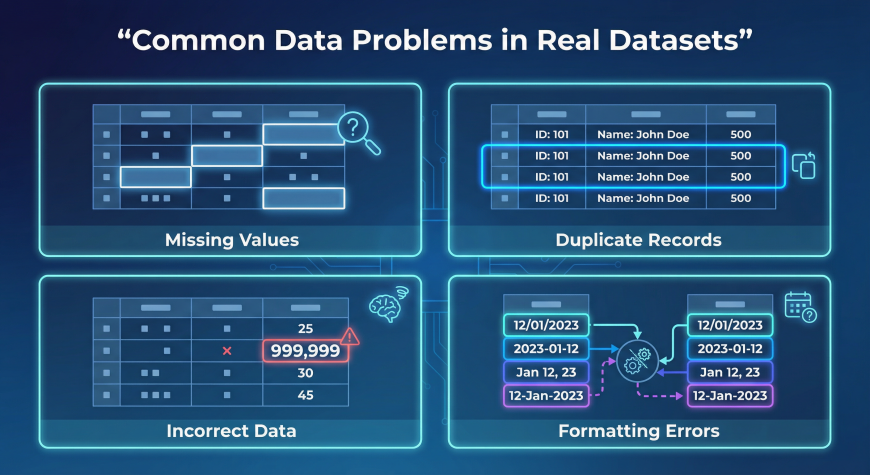
Most real world datasets contain multiple types of issues that need to be addressed before analysis.
Understanding these problems helps analysts detect and fix them efficiently.
Missing Values
Missing data occurs when some fields in a dataset do not contain values.
Consider the following example of a product dataset.
| Product | Price | Quantity |
|---|---|---|
| Laptop | 800 | 5 |
| Phone | (missing) | 3 |
In this example, the price for the phone is missing.
Missing values can occur for several reasons. Sometimes users forget to fill out forms, systems fail to record data properly, or information simply becomes unavailable.
There are several ways to handle missing values.
Analysts may remove incomplete rows, replace missing values with averages, or estimate values based on other information in the dataset.
The best method depends on the context of the analysis.
Duplicate Records
Duplicate records occur when the same entry appears more than once in a dataset.
For example, a sales dataset might contain the same transaction recorded twice.
Duplicate entries can cause significant problems during analysis because they inflate numbers such as total sales or customer counts.
Removing duplicate rows ensures that each record represents a unique event.
Most data analysis tools provide built in functions to detect and remove duplicate records.
Incorrect Data
Incorrect data refers to values that are unrealistic or logically impossible.
Examples include:
Age values such as 150
Negative product prices
Invalid dates such as February 30
These types of errors usually occur due to manual data entry mistakes or system errors.
Analysts must detect and correct such values before using the dataset for analysis.
Formatting Errors
Formatting inconsistencies occur when the same type of information appears in multiple formats.
For example, dates might appear as:
2024/01/01
01-01-2024
January 1 2024
Similarly, country names might appear in different formats such as:
USA
U.S.A
United States
These inconsistencies can make analysis difficult because systems may treat them as different values.
Standardizing formats ensures consistency across the dataset.
Step by Step Data Cleaning Process
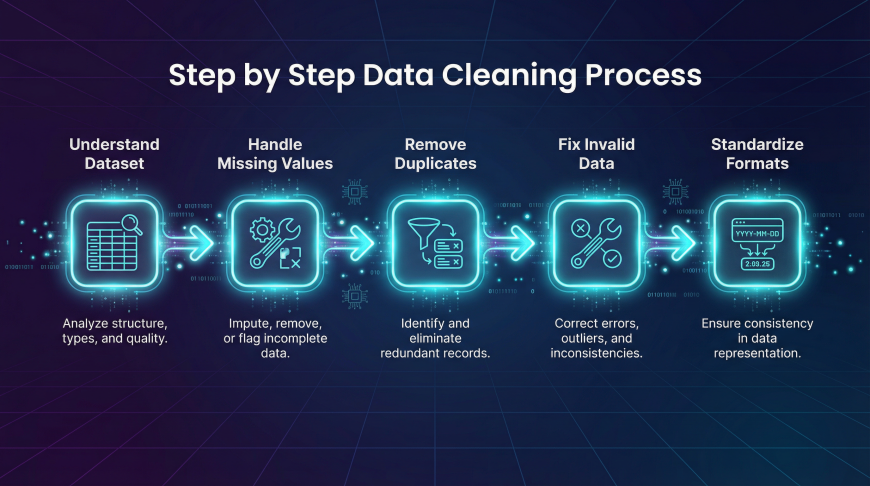
Cleaning data usually follows a structured workflow.
Step 1: Understand the Dataset
Before making any changes, analysts must first explore the dataset.
This includes checking the column names, data types, and the overall structure of the dataset.
Understanding what each column represents helps analysts identify potential issues.
They should also look for missing values and unusual patterns within the data.
Step 2: Handle Missing Values
After identifying missing values, analysts must decide how to handle them.
Some incomplete records can simply be removed if they represent a small portion of the dataset.
In other cases, missing values may be replaced using averages, median values, or other estimation techniques.
Choosing the correct approach ensures that the dataset remains accurate without losing valuable information.
Step 3: Remove Duplicate Records
Duplicate records should be detected and removed to ensure data accuracy.
Tools such as Excel, SQL, and Python provide built in functions for identifying duplicate rows.
Removing duplicates prevents inflated counts and ensures that each record represents a unique event.
Step 4: Correct Invalid Data
Analysts must check for unrealistic values or errors in the dataset.
For example, if a product price appears as negative or if an age value exceeds reasonable limits, these entries must be corrected or removed.
Correcting invalid data ensures the reliability of analysis results.
Step 5: Standardize Data Formats
Finally, data formats should be standardized to ensure consistency.
Dates should follow a single format. Text values such as country names or product categories should be consistent across the dataset.
Standardization makes data easier to analyze and prevents confusion during calculations.
Data Cleaning Example
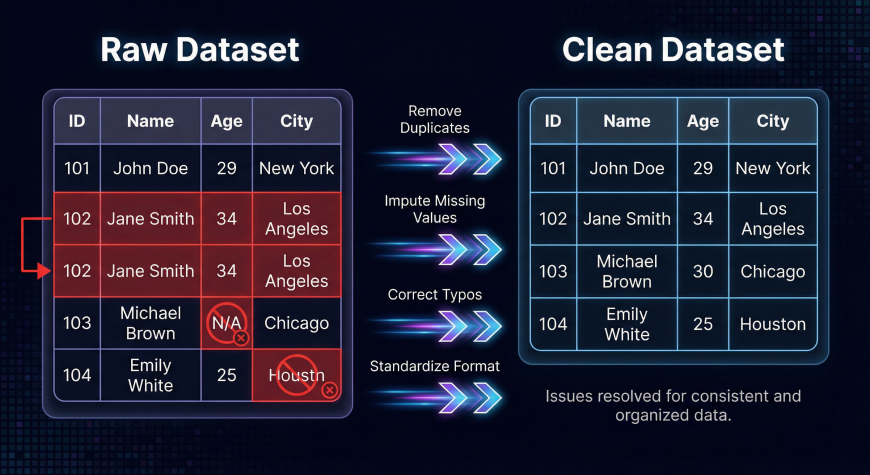
Consider the following raw dataset.
| Product | Price | Quantity |
|---|---|---|
| Laptop | 800 | 5 |
| Phone | 3 | |
| Laptop | 800 | 5 |
| Tablet | -200 | 2 |
This dataset contains several issues.
The phone product has a missing price. The laptop entry appears twice, creating a duplicate record. The tablet price is negative, which is unrealistic.
After cleaning the dataset, the corrected version might look like this.
| Product | Price | Quantity |
|---|---|---|
| Laptop | 800 | 5 |
| Phone | 600 | 3 |
| Tablet | 200 | 2 |
The missing value has been filled, the duplicate row removed, and the incorrect price corrected.
This cleaned dataset is now ready for analysis.
Tools Used for Data Cleaning
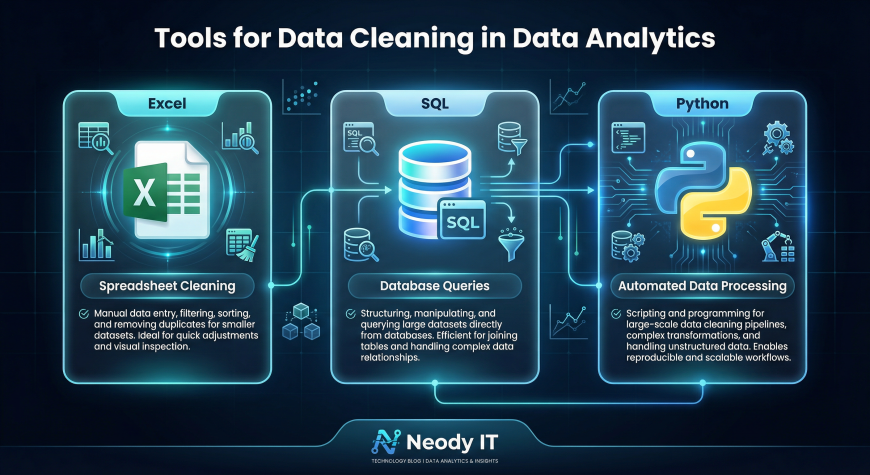
Data analysts use several tools to clean and prepare datasets.
Excel
Excel is one of the most widely used tools for basic data cleaning tasks.
Analysts can remove duplicates, filter records, identify missing values, and perform quick corrections using spreadsheet features.
SQL
SQL is commonly used when datasets are stored in databases.
Analysts can write queries to remove duplicate rows, filter invalid records, and update incorrect values directly within database tables.
Python and Pandas
Python is widely used for advanced data cleaning tasks.
Libraries such as Pandas allow analysts to handle missing values, detect outliers, and automate cleaning processes for large datasets.
Python is particularly useful when working with large or complex datasets.
Data Cleaning Checklist
Before analyzing any dataset, analysts should perform a basic quality check.
Important checks include identifying missing values, detecting duplicate rows, verifying data type consistency, and identifying unrealistic values.
Formatting issues should also be corrected so that all values follow consistent standards.
Following this checklist ensures that the dataset is reliable and ready for analysis.
Example Dataset for Practice
One of the best ways to learn data cleaning is by practicing with datasets that contain errors.
Beginners can create small practice datasets with missing values, duplicates, and formatting inconsistencies.
Cleaning these datasets helps build practical experience and improves problem solving skills.
Many platforms such as Kaggle also provide datasets that can be used for practicing data cleaning and analysis.
Why Data Cleaning is Critical for Machine Learning
Machine learning models rely heavily on the quality of data used during training.
If a dataset contains errors or inconsistent values, the model will learn incorrect patterns.
This can result in inaccurate predictions, biased models, and unreliable results.
For this reason, data scientists often spend a large portion of their time cleaning and preparing data before training machine learning models.
High quality data leads to more accurate and reliable models.
Final Takeaway
Data cleaning is a fundamental step in every data analytics workflow.
Clean data ensures accurate analysis, reliable insights, and better machine learning performance.
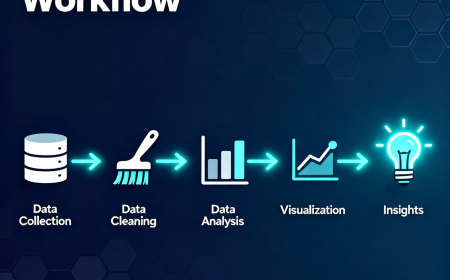
The typical workflow follows a simple sequence.
Raw data is collected. The data is cleaned and corrected. Analysts then explore and analyze the dataset. Finally, insights are generated to support decision making.
At Neody IT, we encourage beginners to treat data cleaning as a core skill rather than a minor step.
Mastering data cleaning not only improves the quality of your analysis but also builds a strong foundation for advanced fields such as machine learning and data science.
What's Your Reaction?
 Like
4
Like
4
 Dislike
0
Dislike
0
 Love
1
Love
1
 Funny
0
Funny
0
 Angry
0
Angry
0
 Sad
0
Sad
0
 Wow
1
Wow
1





-
 SumitINFORMATIVE ☺️