




























SQL Tutorial with Examples and Practice Sets
Learn SQL from scratch with practical examples, sample databases, and hands-on practice sets. This beginner-friendly guide by Neody IT covers SELECT, WHERE, ORDER BY, JOIN, and more.
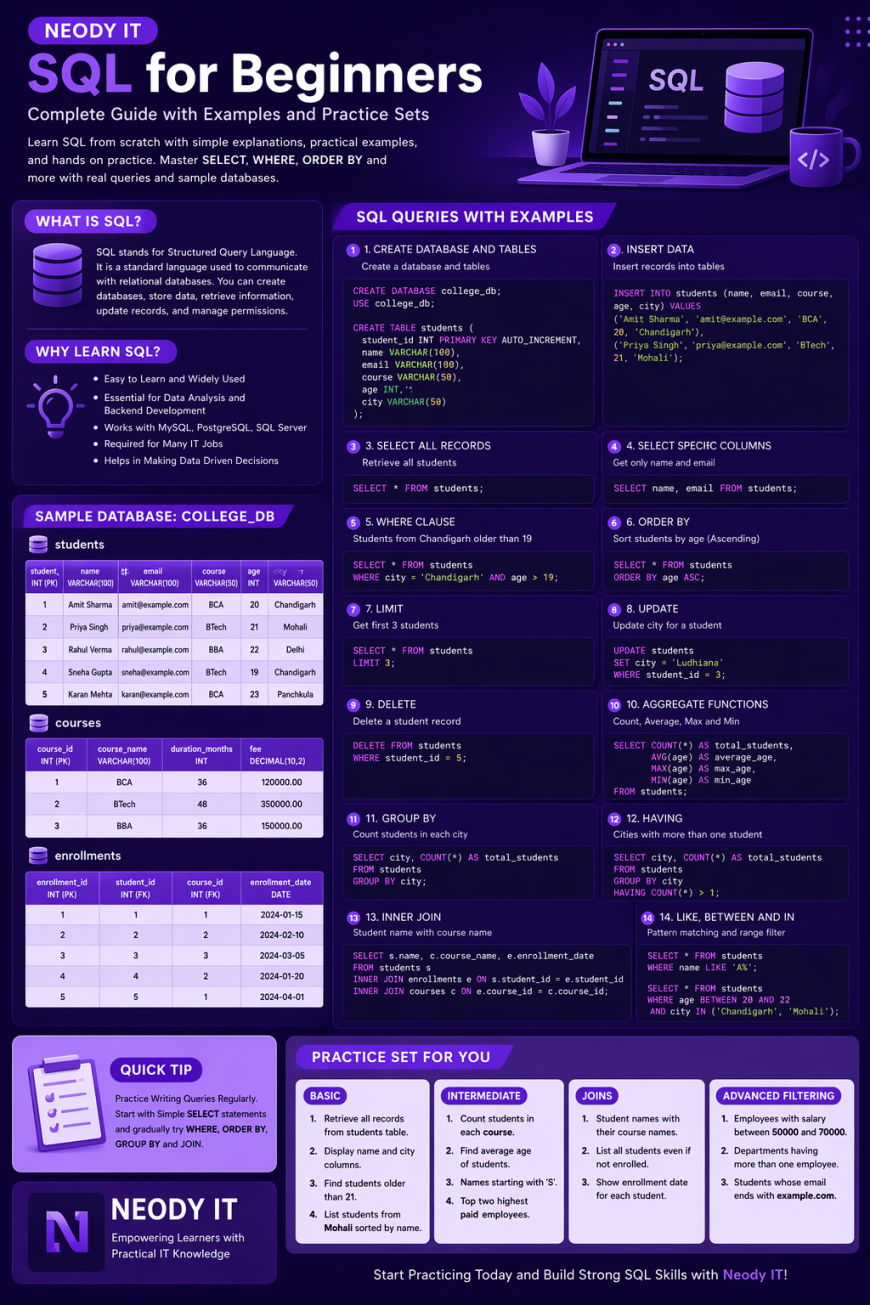
Introduction
In today’s data driven world, the ability to work with databases is one of the most valuable skills for developers, analysts, and business professionals. Whether you are building a web application, analyzing customer behavior, or managing enterprise systems, Structured Query Language, commonly known as SQL, plays a crucial role.
At Neody IT, we believe that understanding SQL is essential for anyone who wants to work with real world data. This guide is designed for beginners who want to learn SQL from scratch using simple explanations, practical examples, and hands on practice sets.
What is SQL?
SQL stands for Structured Query Language. It is a standard language used to communicate with relational databases. With SQL, you can create databases, store data, retrieve information, update records, and manage permissions.
Why Learn SQL?
-
It is easy to learn and widely used.
-
Essential for data analysis and backend development.
-
Works with popular databases such as MySQL, PostgreSQL, SQL Server, and Oracle.
Also Read → Why Resume Not Shortlisted 2026: 8 Fixes -
Required for roles like Data Analyst, Backend Developer, and Database Administrator.
-
Helps in making data driven decisions.
Understanding Databases and Tables
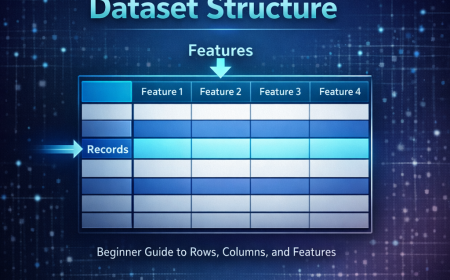
A database is an organized collection of data. Inside a database, data is stored in tables, which consist of rows and columns.
-
Row represents a single record.
-
Column represents a specific attribute of the data.
For example, a table named students may contain columns like id, name, email, and course.
Creating a Sample Database
Let us create a sample database for a college management system.
-- Create Database
CREATE DATABASE college_db;

-- Use the Database
USE college_db;
Creating Tables
-- Students Table
CREATE TABLE students (
    student_id INT PRIMARY KEY AUTO_INCREMENT,
    name VARCHAR(100),
    email VARCHAR(100),
    course VARCHAR(50),
    age INT,
    city VARCHAR(50)
);

-- Courses Table
CREATE TABLE courses (
    course_id INT PRIMARY KEY AUTO_INCREMENT,
    course_name VARCHAR(100),
    duration_months INT,
    fee DECIMAL(10,2)
);

-- Enrollments Table
CREATE TABLE enrollments (
    enrollment_id INT PRIMARY KEY AUTO_INCREMENT,
    student_id INT,
    course_id INT,
    enrollment_date DATE,
    FOREIGN KEY (student_id) REFERENCES students(student_id),
    FOREIGN KEY (course_id) REFERENCES courses(course_id)
);
Inserting Data into Tables
-- Insert Students
INSERT INTO students (name, email, course, age, city) VALUES
('Amit Sharma', 'amit@example.com', 'BCA', 20, 'Chandigarh'),
('Priya Singh', 'priya@example.com', 'BTech', 21, 'Mohali'),
('Rahul Verma', 'rahul@example.com', 'BBA', 22, 'Delhi'),
('Sneha Gupta', 'sneha@example.com', 'BTech', 19, 'Chandigarh'),
('Karan Mehta', 'karan@example.com', 'BCA', 23, 'Panchkula');

-- Insert Courses
INSERT INTO courses (course_name, duration_months, fee) VALUES
('BCA', 36, 120000),
('BTech', 48, 350000),
('BBA', 36, 150000);

-- Insert Enrollments
INSERT INTO enrollments (student_id, course_id, enrollment_date) VALUES
(1, 1, '2024-01-15'),
(2, 2, '2024-02-10'),
(3, 3, '2024-03-05'),
(4, 2, '2024-01-20'),
(5, 1, '2024-04-01');
Retrieving Data with SELECT
The SELECT statement is used to retrieve data from a table.
-- Retrieve all students
SELECT * FROM students;

-- Retrieve specific columns
SELECT name, email FROM students;

-- Retrieve unique cities
SELECT DISTINCT city FROM students;
Filtering Data with WHERE
The WHERE clause is used to filter records based on specific conditions.
-- Students from Chandigarh
SELECT * FROM students
WHERE city = 'Chandigarh';

-- Students older than 20
SELECT name, age FROM students
WHERE age > 20;

-- Students enrolled in BTech
SELECT * FROM students
WHERE course = 'BTech';
Using Logical Operators
-- AND operator
SELECT * FROM students
WHERE city = 'Chandigarh' AND age > 19;

-- OR operator
SELECT * FROM students
WHERE city = 'Delhi' OR city = 'Mohali';

-- NOT operator
SELECT * FROM students
WHERE NOT course = 'BCA';
Sorting Results with ORDER BY
The ORDER BY clause sorts the result set in ascending or descending order.
-- Sort students by age in ascending order
SELECT * FROM students
ORDER BY age ASC;

-- Sort students by name in descending order
SELECT * FROM students
ORDER BY name DESC;
Using LIMIT to Restrict Results
-- Retrieve the first three students
SELECT * FROM students
LIMIT 3;
Updating Records with UPDATE
-- Update city for a student
UPDATE students
SET city = 'Ludhiana'
WHERE student_id = 3;
Deleting Records with DELETE
-- Delete a specific student
DELETE FROM students
WHERE student_id = 5;
Aggregate Functions
Aggregate functions perform calculations on a set of values.
-- Count total students
SELECT COUNT(*) AS total_students FROM students;

-- Average age of students
SELECT AVG(age) AS average_age FROM students;

-- Maximum and minimum age
SELECT MAX(age) AS max_age, MIN(age) AS min_age FROM students;

-- Total course fee
SELECT SUM(fee) AS total_fee FROM courses;
Grouping Data with GROUP BY
-- Count students in each city
SELECT city, COUNT(*) AS total_students
FROM students
GROUP BY city;

-- Average age per course
SELECT course, AVG(age) AS average_age
FROM students
GROUP BY course;
Filtering Groups with HAVING
-- Cities with more than one student
SELECT city, COUNT(*) AS total_students
FROM students
GROUP BY city
HAVING COUNT(*) > 1;
Joining Multiple Tables
Joins are used to combine data from multiple tables.
INNER JOIN
SELECT s.name, c.course_name, e.enrollment_date
FROM students s
INNER JOIN enrollments e ON s.student_id = e.student_id
INNER JOIN courses c ON e.course_id = c.course_id;
LEFT JOIN
SELECT s.name, c.course_name
FROM students s
LEFT JOIN enrollments e ON s.student_id = e.student_id
LEFT JOIN courses c ON e.course_id = c.course_id;
Using LIKE for Pattern Matching
-- Names starting with 'A'
SELECT * FROM students
WHERE name LIKE 'A%';

-- Emails ending with 'example.com'
SELECT * FROM students
WHERE email LIKE '%@example.com';
Using BETWEEN and IN
-- Students aged between 20 and 22
SELECT * FROM students
WHERE age BETWEEN 20 AND 22;

-- Students from selected cities
SELECT * FROM students
WHERE city IN ('Chandigarh', 'Mohali');
Creating an Employee Database Example
CREATE DATABASE company_db;
USE company_db;

CREATE TABLE employees (
    emp_id INT PRIMARY KEY AUTO_INCREMENT,
    emp_name VARCHAR(100),
    department VARCHAR(50),
    salary DECIMAL(10,2),
    joining_date DATE
);

INSERT INTO employees (emp_name, department, salary, joining_date) VALUES
('Rohit Kumar', 'IT', 60000, '2023-01-10'),
('Anjali Mehra', 'HR', 45000, '2022-11-15'),
('Vikas Sharma', 'Finance', 55000, '2021-05-20'),
('Neha Verma', 'IT', 70000, '2020-03-12'),
('Sandeep Singh', 'Marketing', 48000, '2023-07-01');
Example Queries
-- Highest salary
SELECT emp_name, salary
FROM employees
ORDER BY salary DESC
LIMIT 1;

-- Employees in IT department
SELECT * FROM employees
WHERE department = 'IT';

-- Average salary by department
SELECT department, AVG(salary) AS avg_salary
FROM employees
GROUP BY department;
Practice Set for Beginners
Practice Set 1: Basic Queries
-
Retrieve all records from the
studentstable. -
Display only the
nameandcitycolumns. -
Find students who are older than 21.
-
List students from Mohali sorted by name.
Practice Set 2: Intermediate Queries
-
Count the number of students in each course.
-
Find the average age of students.
-
Display students whose names start with the letter S.
-
Retrieve the top two highest paid employees.
Practice Set 3: Join Queries
-
Display student names along with their enrolled course names.
-
List all students even if they are not enrolled in any course.
-
Show the enrollment date for each student.
Practice Set 4: Advanced Filtering
-
Find employees with salaries between 50,000 and 70,000.
-
Display departments having more than one employee.
-
Retrieve students whose email ends with
example.com.
Real World Applications of SQL
SQL is used across various industries and applications:
-
Web Development: Managing user data, authentication, and transactions.
-
Data Analytics: Extracting insights from large datasets.
-
Enterprise Systems: Powering ERP and CRM platforms.
-
E-commerce: Handling orders, customers, and inventory.
-
Banking and Finance: Managing secure and transactional data.
At Neody IT, SQL forms the backbone of many enterprise solutions such as ERP systems, attendance management platforms, and analytics dashboards. Mastering SQL enables developers to build scalable and efficient applications.
Tips for Learning SQL Effectively
-
Practice regularly using real datasets.
-
Understand database design and relationships.
-
Write queries manually instead of relying solely on GUI tools.
-
Use online platforms like MySQL Workbench or phpMyAdmin.
-
Experiment with joins and aggregate functions.
-
Work on small projects to strengthen your understanding.
Conclusion
SQL is an essential skill for anyone working with data. From simple data retrieval using SELECT and WHERE to more advanced operations like JOIN, GROUP BY, and aggregate functions, SQL provides powerful tools to manage and analyze information efficiently.
This comprehensive guide from Neody IT has introduced you to the fundamentals of SQL with practical examples and hands on practice sets. By consistently practicing these concepts, you can build a strong foundation and confidently work with real world databases.
Start experimenting with the provided sample databases and queries today. With dedication and practice, SQL will soon become one of your most valuable technical skills.
What's Your Reaction?
 Like
1
Like
1
 Dislike
0
Dislike
0
 Love
2
Love
2
 Funny
1
Funny
1
 Angry
0
Angry
0
 Sad
0
Sad
0
 Wow
1
Wow
1